Cross Out
The classic breakout: BUY when the EMA closes above the range high, SELL when it closes below the range low.
FCC_EA records the high and low of the window you choose — the Frankfurt or London open, the New York cash open, the Asian range, pre-market or any custom hours you set — and trades the breakout, or the failed breakout, by rules you set. Two ranges a day, any symbol in MetaTrader 5. If the open stops behaving, change the window or the filters, or switch method, with no new EA to buy.
Free backtest: every feature in the MT5 Strategy Tester, no card. Backtest results depend on your broker’s data and don’t guarantee future results.
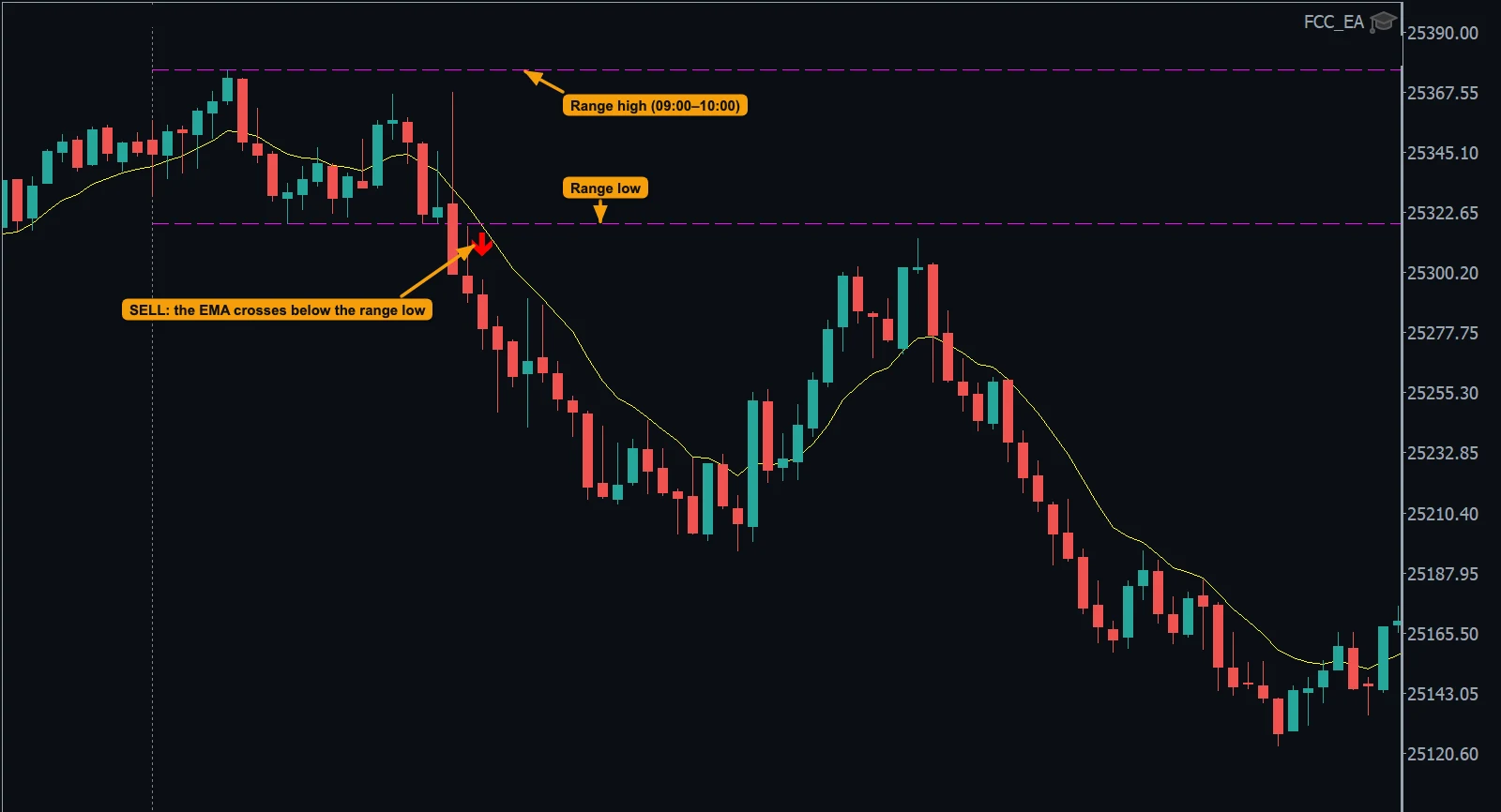
The classic breakout: BUY when the EMA closes above the range high, SELL when it closes below the range low.
The failed breakout, traded the other way: BUY when the EMA comes back up through the range low, SELL when it comes back down through the high.
Take whichever comes first — the breakout or the return into the range.
One window before Europe and one before the US open, for example. Active range only stops the first range once the second one is set.
Set how many trades each range may give per day, or turn a range off.
Exit automatically when the EMA crosses back into the range — a BUY when it falls back below the high, a SELL when it rises back above the low.
Enter range times in New York, London, Central Europe, Tokyo or UTC time — FCC_EA converts them to your broker’s server time, daylight saving included.
Add a trend filter, a spread filter for wild opens, a maximum price distance and trading days — skip Fridays, for example.
Stop loss and take profit, breakeven, partial close, trailing and a daily close-all time — the same engine as every other method.
One of 7 methods in FCC_EA. Combine it with filters and exits, change it when the market changes, and run other strategies on other symbols at the same time. See all methods
Download FCC_EA free and backtest it in the MetaTrader 5 Strategy Tester, with every feature, on your broker’s history (all but the last 7 days). No license key, no card.
Backtest results depend on your broker’s data and don’t guarantee future results.
Trading leveraged products carries a high risk of loss. FCC_EA does not promise any trading results.
Yes. Set the time zone to New York and the range window to, for example, 09:30–09:45 or 09:30–10:00. A window has to stay within one server day.
A single spike through the range edge is enough to trigger a price-based breakout. Requiring the trigger EMA to cross the edge on a closed candle filters those spikes out. You choose the EMA period and the signal timeframe.
Any symbol in MetaTrader 5. Opening-range strategies are most often used on indices such as DE40, NAS100, US30 and US500 and on gold, around their session opens. Settings need to be adapted to each market.
Yes — Display Range Breakout Levels draws the high and low of each range, and the info panel shows the range times.
Technically yes — see FCC_EA for prop-firm traders. Check your firm’s rules on Expert Advisors first.
We can’t promise that, and nobody honestly can. Results depend on the market, your broker, your settings and your risk management. Trading leveraged products can lose you money. Always test settings on a demo account first and read the Risk Disclaimer.
Liquidity levels, sweeps, FVG and IFVG entries, order blocks, rejection blocks and killzones — automated.
ExploreTwo daily ranges, EMA-confirmed breakouts and failed-breakout trades, in your time zone.
ExploreSession VWAP with ±1/2/3σ bands: touch, reclaim, EMA-cross and IFVG entries.
ExploreDaily PP, R1–R4 and S1–S4 or mid-pivots, traded on the touch or the reclaim.
ExploreEMA crosses, SMMA bands and VIDYA/TMA — with slope, trend and chop filters.
ExploreManual trading only? The one-click panel with the PLAN tool and trade management on its own — free, or Pro for $49 once.
ExploreBuild your first strategy and backtest it free, then start monthly and cancel anytime, or pay once. Prices exclude VAT.
Free backtest: every feature in the MT5 Strategy Tester, no card. Backtest results depend on your broker’s data and don’t guarantee future results.