Price runs the level
Price trades beyond a marked high or low — a wick is enough. The level is now armed: red for a swept high, green for a swept low.
FCC_EA marks buy-side and sell-side liquidity, watches for the sweep and takes the entry on the reclaim or on the inverted FVG — inside the killzones you set. You stop staring at the chart; your rules still decide every trade. When your read of the market changes, change the pools, killzones or entry; it’s the same EA.
Free backtest: every feature in the MT5 Strategy Tester, no card. Backtest results depend on your broker’s data and don’t guarantee future results.
Turn on the pools you trade and FCC_EA keeps them on the chart, labelled and updated — no more redrawing PDH, PDL and session ranges every morning.
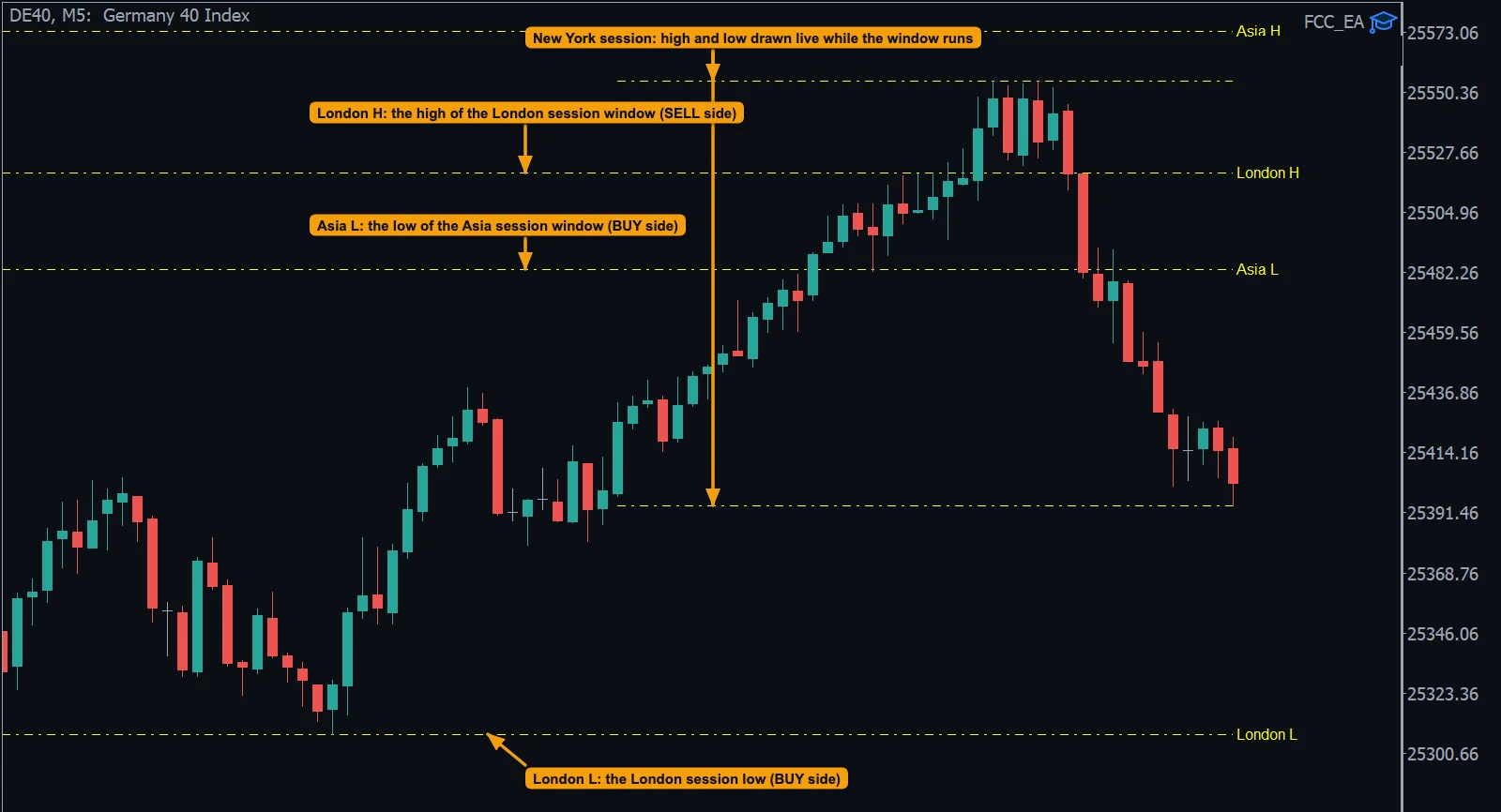
The same sequence you look for by hand — written as rules the EA follows on every bar.
Price trades beyond a marked high or low — a wick is enough. The level is now armed: red for a swept high, green for a swept low.
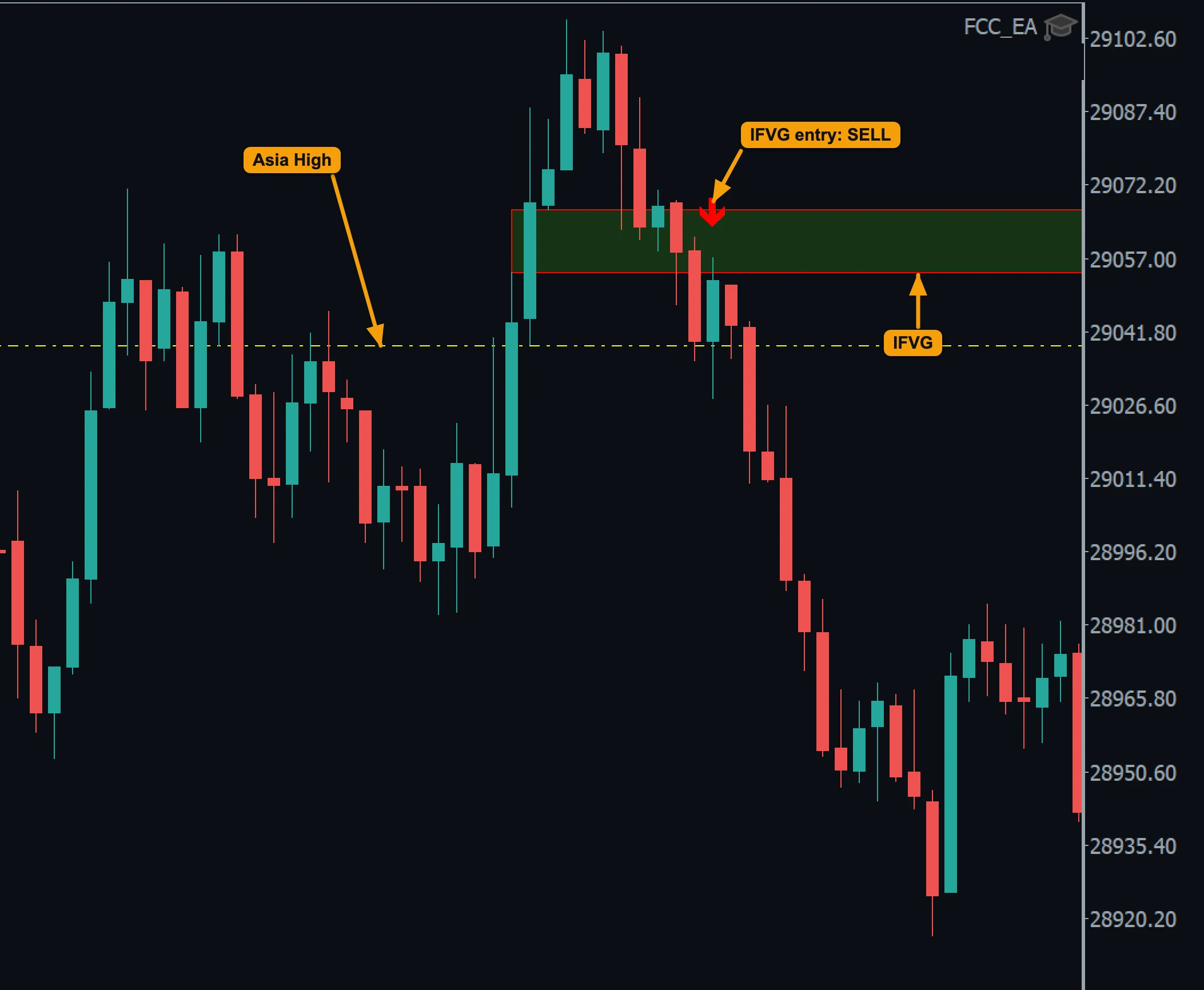
Reclaim: a candle closes back on the original side of the level. IFVG: a fair value gap left by the move into the sweep is inverted — price closes back through it.
FCC_EA enters on the confirming close or on the retest of the inverted gap, then manages the trade: stop loss and take profit, breakeven, partial close and trailing.
Prefer no confirmation? The Touch trigger enters the moment price reaches the level.
Fair value gaps and inverted FVGs are drawn as boxes and filtered with the same rules many ICT traders apply by eye.
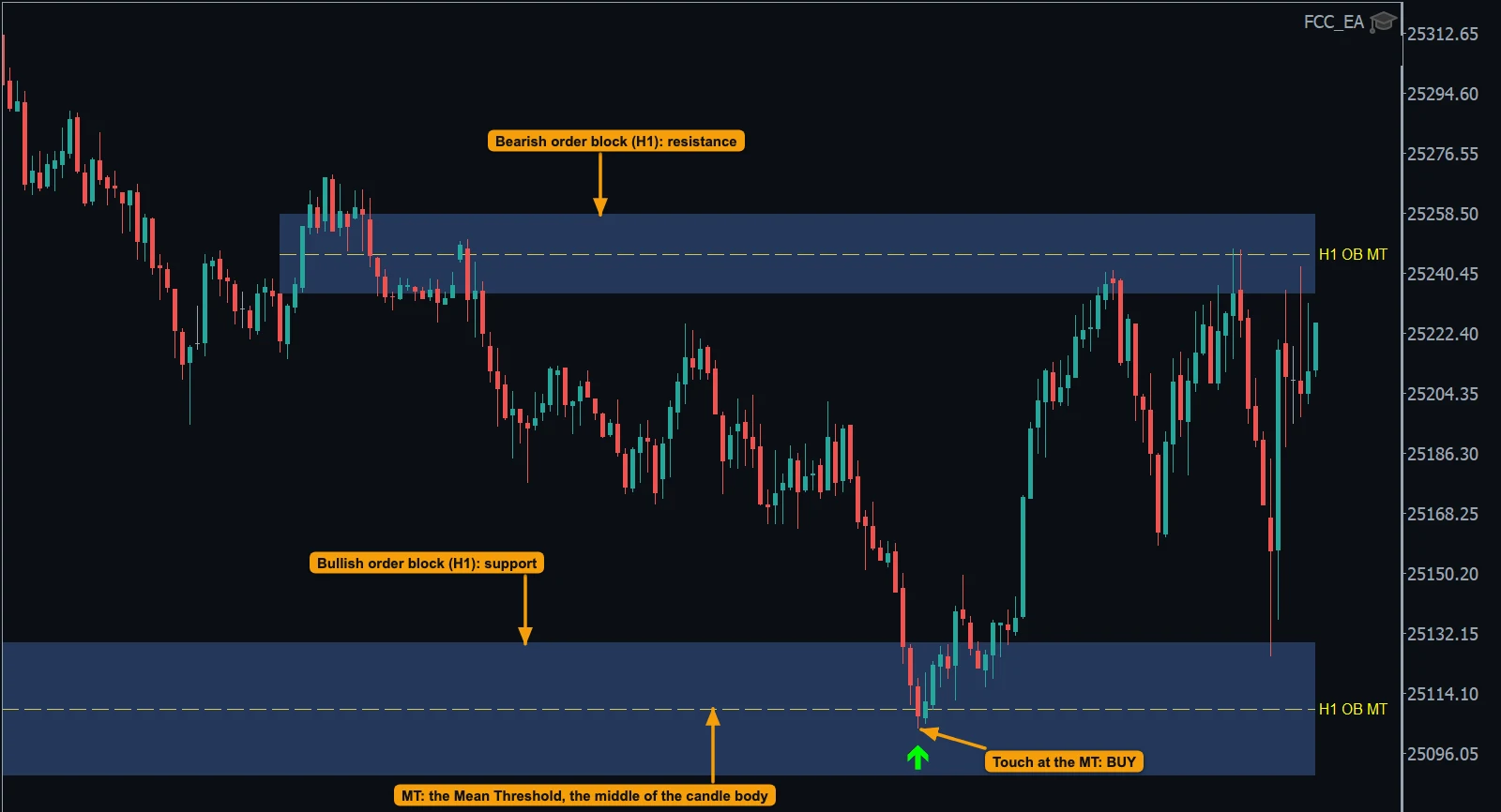
The last opposite candle before a strong move that leaves a fair value gap becomes a level: a bullish order block is support for BUY setups, a bearish one is resistance for SELL setups. FCC_EA trades its Mean Threshold (MT), the middle of the candle body.
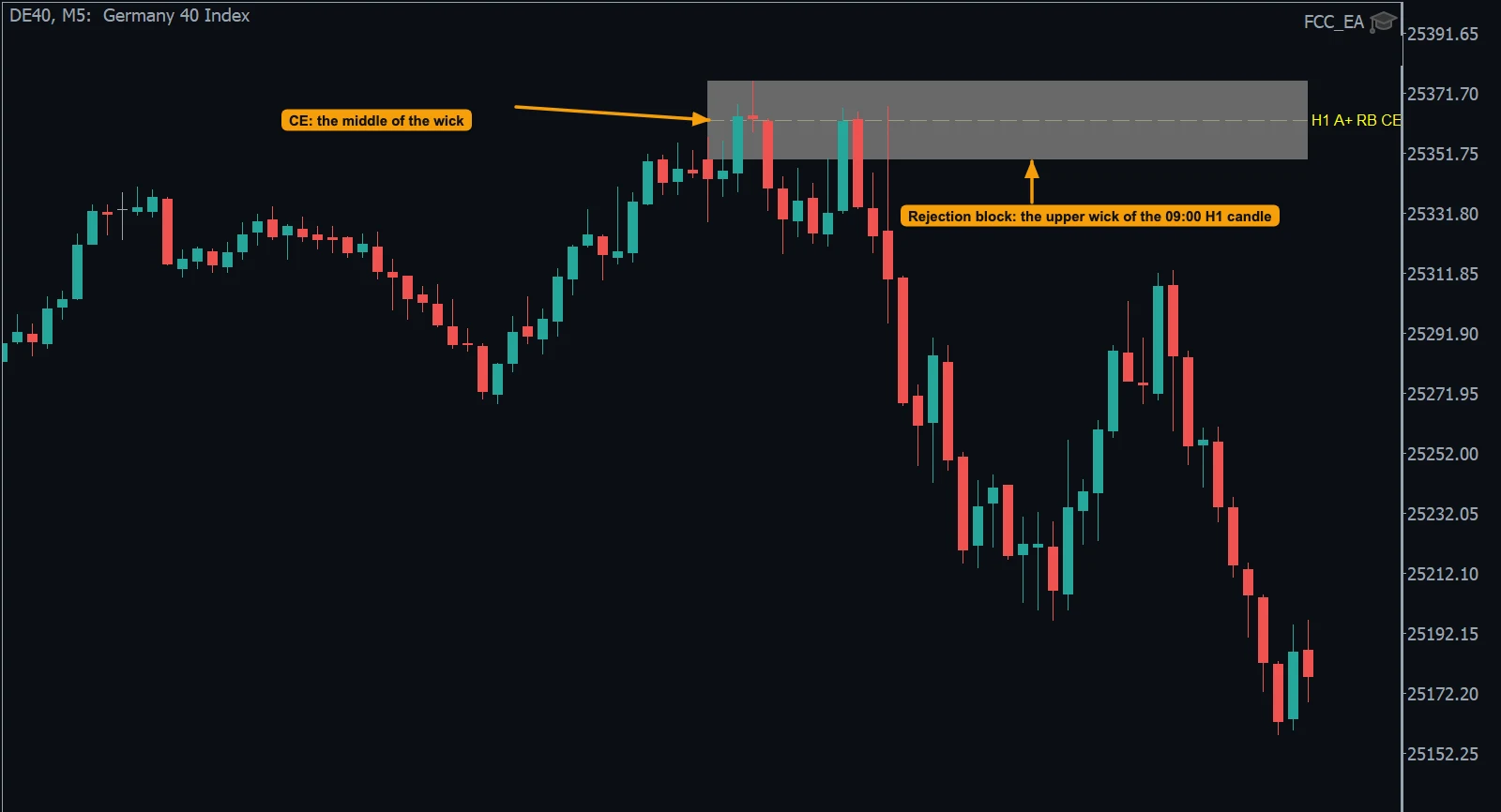
A candle whose wick sweeps the previous candle’s high or low and closes back — confirmed by a fair value gap — becomes a level. The middle of the wick (CE) is what FCC_EA trades.
Set the trading window and two breaks for any session — Asia, London, New York, pre-market or your own hours. Enter the times in server time or in New York, London, Central Europe, Tokyo or UTC time; FCC_EA converts them, daylight saving included. Outside the window it takes no new trades.
Add a trend, VWAP or pivot filter, a volume-spike confirmation, a spread filter, a limit of trades per day and a pause after a loss.
Prefer to pull the trigger? Keep the levels and gaps on the chart and enter from the Trading Panel or plan the trade with the PLAN tool — FCC_EA manages it the same way.
One of 7 methods in FCC_EA. Combine it with filters and exits, change it when the market changes, and run other strategies on other symbols at the same time. See all methods
Download FCC_EA free and backtest it in the MetaTrader 5 Strategy Tester, with every feature, on your broker’s history (all but the last 7 days). No license key, no card.
Backtest results depend on your broker’s data and don’t guarantee future results.
Trading leveraged products carries a high risk of loss. FCC_EA does not promise any trading results.
No. ICT refers to the Inner Circle Trader methodology; FCCAlgo is not affiliated with or endorsed by ICT. FCC_EA automates concepts that many traders use — liquidity, sweeps, fair value gaps — with rules you configure.
Any symbol your broker offers in MetaTrader 5 — indices such as NAS100, US30, US500 or DE40, gold and forex pairs. Levels, gap sizes and session times differ per market, so settings need to be adapted to each one.
Yes — up to three at once, for example M15, H1 and H4. Each timeframe keeps its own blocks, and each block on the chart is labelled with its timeframe (for example H1 OB MT). Rejection blocks work the same way.
Yes — that is the IFVG trigger of the Liquidity Sweep method: after a level is swept, FCC_EA waits for an inverted fair value gap in the reversal direction and enters on its close or on the retest.
Yes. Turn on Use Order Blocks (FVG-confirmed)? in the Liquidity Sweep method and FCC_EA marks bullish and bearish order blocks on up to three timeframes and trades their Mean Threshold with the Touch, Reclaim or IFVG trigger. See the Order Blocks guide.
Not at the moment. FCC_EA covers liquidity levels, sweeps, FVG / IFVG, order blocks and A+ rejection blocks. The break of structure is used only as an optional check for order blocks.
Technically yes — see FCC_EA for prop-firm traders. Check your firm’s rules on Expert Advisors first.
We can’t promise that, and nobody honestly can. Results depend on the market, your broker, your settings and your risk management. Trading leveraged products can lose you money. Always test settings on a demo account first and read the Risk Disclaimer.
Liquidity levels, sweeps, FVG and IFVG entries, order blocks, rejection blocks and killzones — automated.
ExploreTwo daily ranges, EMA-confirmed breakouts and failed-breakout trades, in your time zone.
ExploreSession VWAP with ±1/2/3σ bands: touch, reclaim, EMA-cross and IFVG entries.
ExploreDaily PP, R1–R4 and S1–S4 or mid-pivots, traded on the touch or the reclaim.
ExploreEMA crosses, SMMA bands and VIDYA/TMA — with slope, trend and chop filters.
ExploreManual trading only? The one-click panel with the PLAN tool and trade management on its own — free, or Pro for $49 once.
ExploreBuild your first strategy and backtest it free, then start monthly and cancel anytime, or pay once. Prices exclude VAT.
Free backtest: every feature in the MT5 Strategy Tester, no card. Backtest results depend on your broker’s data and don’t guarantee future results.