Quick mode
The compact panel: orders, TP and SL, BE, PARTIAL and CLOSE ALL. Breakeven, partial close, trailing and grid run on the values from the panel’s inputs.
Open trades in one click, plan them on the chart and see your risk live in MetaTrader 5. Breakeven, partial close and trailing then manage every trade for you.
Free, or Pro for $49 — a one-time payment, no expiry date.
Free needs only your email — no card, no key.
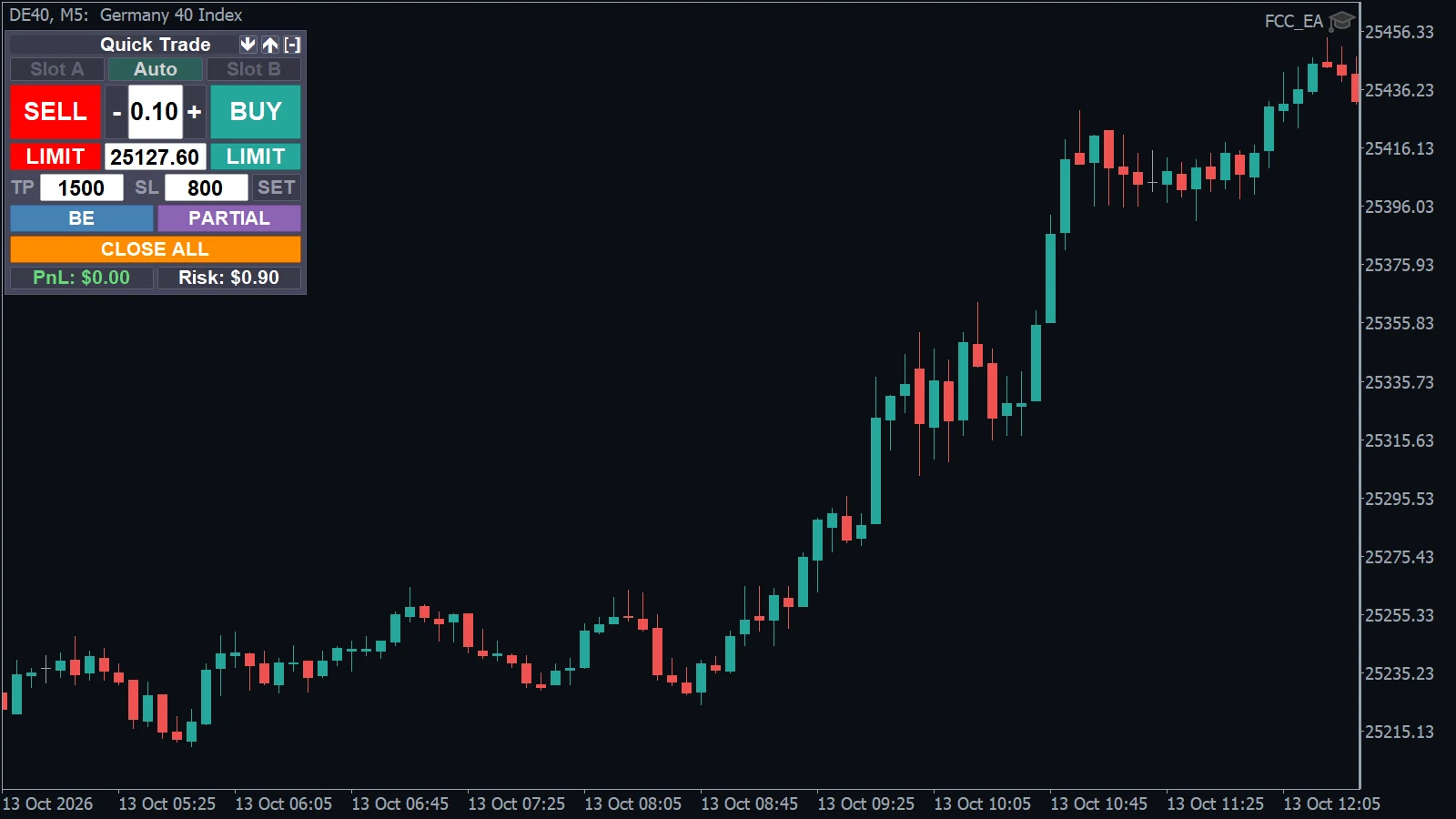
The compact panel: orders, TP and SL, BE, PARTIAL and CLOSE ALL. Breakeven, partial close, trailing and grid run on the values from the panel’s inputs.
The panel gets a MANAGEMENT section. Switch GRID, BE, TRAIL and PARTIAL on or off with a click and set their distances right on the chart. Both editions, Free and Pro, have both modes.
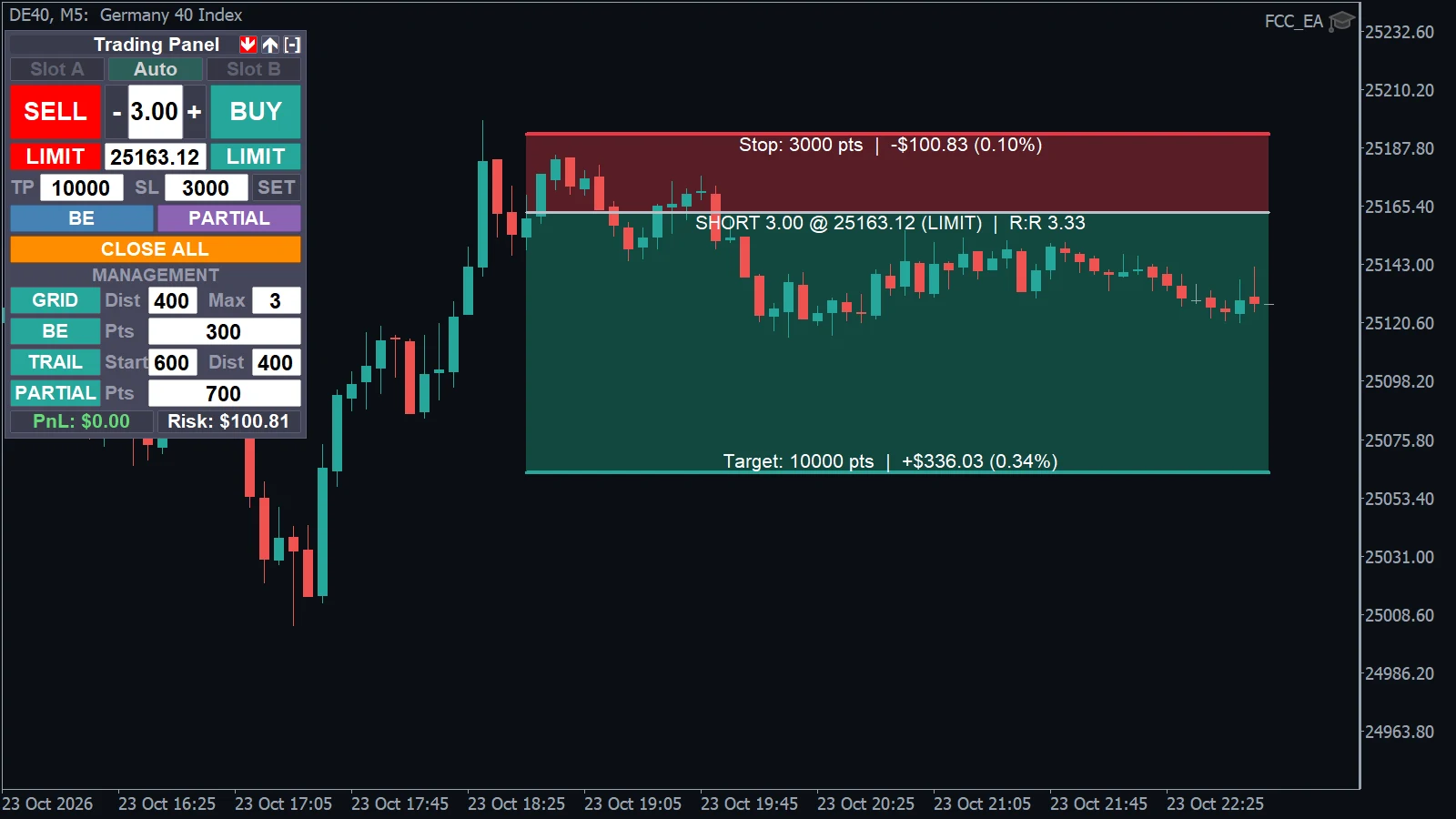
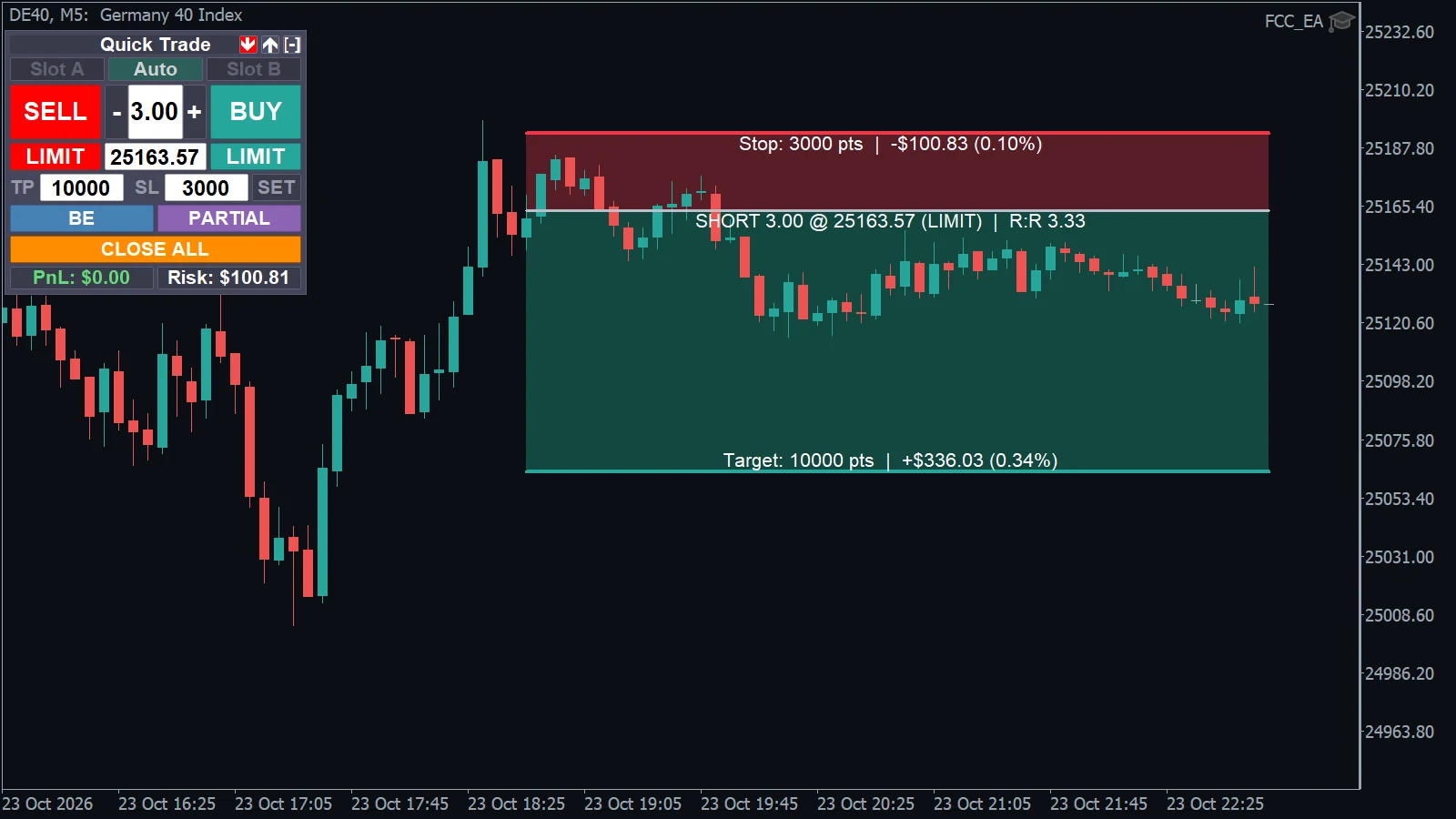
Free covers the essentials. Pro adds the full trade-management engine.
The PLAN tool and the footer show the money at your stop, the target and the R:R before the order goes in. No mental maths at 9:30.
Breakeven, partial close, trailing and grid manage the trade with the distances and limits you set, in Free and Pro.
Email only: no card, no license key, no time limit. The whole one-click panel, Quick and Full mode and the PLAN tool.
Pyramiding, hedge mode with a hard stop, virtual SL, Equity Guard, close-all time and Telegram alerts, for $49 once. Pyramiding and hedge add risk, so test them on demo first.
Start with Free — no key, no time limit — or get Pro for a one-time $49, with updates for as long as we develop it. Using FCC_EA? You already have the full panel.
The one-click panel with the PLAN tool and the essential trade management. No key, no time limit.
Everything in Free plus the full trade-management engine for manual traders.
Trading leveraged products carries a high risk of loss. FCC Trading Panel does not promise any trading results.
Want the panel and a bot that trades for you? FCC_EA includes the complete Trading Panel Pro — plus seven signal methods, chart levels, smart filters and much more.
| Feature | Trading Panel Free | Trading Panel Pro | FCC_EA |
|---|---|---|---|
| One-click trading panel (Quick / Full mode) | ✓ | ✓ | ✓ |
| PLAN tool (risk / reward planner) | ✓ | ✓ | ✓ |
| Live PnL and risk footer | ✓ | ✓ | ✓ |
| Management from the chart (GRID / BE / TRAIL / PARTIAL) | ✓ | ✓ | ✓ |
| Breakeven | ✓ | ✓ | ✓ |
| Partial close | ✓ | ✓ | ✓ |
| Trailing stop | BasicBasic: the stop trails by points behind price. Trailing along the SMMA bands is in Pro and FCC_EA. | FullFull: trail by points or along the fast / slow SMMA band, on any timeframe. | FullFull: trail by points or along the fast / slow SMMA band, on any timeframe. |
| Grid | BasicBasic: grid on or off, max orders, distance between orders and lot multiplier, with grid lines on the chart. | FullFull: everything in Basic plus a distance multiplier, one order per candle, a breakout bar filter and the grid timeframe. | FullFull: everything in Basic plus a distance multiplier, one order per candle, a breakout bar filter and the grid timeframe. |
| Pyramiding | — | ✓ | ✓ |
| Hedge mode | — | BasicBasic: the full hedge cycle with a hard stop, basket take profit, breakeven protection, trailing and partial close at breakeven — without the failed-break reset. | FullFull: everything in Basic plus the failed-break reset. |
| Virtual SL (kept in the panel, timeout) | — | ✓ | ✓ |
| Close all at a set time | — | ✓ | ✓ |
| Equity Guard (daily loss alert) | — | ✓ | ✓ |
| Time zone for time inputs (New York, London, …) | — | ✓ | ✓ |
| Telegram & push alerts | — | ✓ | ✓ |
| Info panel and bar close countdown | ✓ | ✓ | ✓ |
| Trading hours (days, sessions, breaks) | — | — | ✓ |
| Auto signals: EMA, SMMA, TMA, VWAP, Pivots, Range Breakout, Liquidity Sweep | — | — | 7 methods |
| Chart levels: liquidity levels, FVG / IFVG, order and rejection blocks, VWAP bands, pivots, ranges | — | — | ✓ |
| Signal filters (trend, chop, VWAP, pivots, spread, loss pause, max trades) | — | — | ✓ |
| Two slots (A / B) with Hedge Signal Mode | — | — | ✓ |
| License | No key needed | Key, 3 MT5 accounts at once | Key, 5 MT5 accounts at once |
| Updates | Email notice | Included for as long as we develop it, in-app notice | Included while subscribed (one-time plan: for as long as we develop it), in-app notice |
| Price | Free | $49 one-time payment | $19 / month, $199 / year or $399 one-time payment (pricing) |
The Trading Panel never opens a trade by itself. FCC_EA is the full Expert Advisor: the same panel next to auto trading with seven signal methods, chart levels, signal filters, trading hours, two position slots and much more.
Click Get it free or Buy Pro in Pricing and finish the checkout with your email. We create your account in the customer portal, where you download the panel; Pro buyers also get their license key there and by email. Then copy the file to MetaTrader 5 and attach it to a chart — see Install the Trading Panel.
Yes. Trading Panel Free costs nothing, has no time limit and needs no license key. It is the full one-click panel with the PLAN tool, breakeven, partial close, a basic trailing stop and a basic grid.
Buy Pro, download the Pro file from the customer portal and put it in place of the Free one, then enter your license key in the panel’s inputs. Your settings and the trades the panel manages stay as they are. See Upgrade to Pro.
One Pro license works on up to 3 MetaTrader 5 accounts at the same time. You can move it to another account from the customer portal. The Free edition has no license and no account limit.
Pro: yes, every version we release is included in the one-time price, for as long as we continue to develop and offer the panel, and the panel tells you when a new version is out. Free: download the new version from the customer portal whenever you like; we let you know by email.
Payments are processed by Whop. All major credit and debit cards are accepted, and additional local payment methods may be offered depending on your country. VAT is added at checkout where applicable.
If a technical problem we can’t fix stops Trading Panel Pro running on your account, you get your money back within 14 days of your first purchase. Trading results, a netting account or a change of mind aren’t covered. Full details: Refund Policy.
The Trading Panel is for manual trading: you decide every entry and the panel manages the trade. FCC_EA is the full Expert Advisor — the same panel plus automatic trading with seven signal methods, chart levels and indicators, signal filters, trading hours, two position slots and the failed-break reset in hedge mode. See the full comparison.
No. FCC_EA has the full Trading Panel built in, with everything Pro has and more. Pro is for traders who only want the panel, without the Expert Advisor.
No, they’re separate products, so there’s no credit. Your Pro license is a one-time purchase and stays yours, with no expiry date. FCC_EA includes the same panel, so once you run FCC_EA you won’t need Pro next to it. Not sure yet? Backtest every FCC_EA feature free in the Strategy Tester first. Backtest results depend on your broker’s data and don’t guarantee future results.
MetaTrader 5 desktop on a hedging account, demo or live. On a netting or exchange account the panel shows a message and doesn’t start. It doesn’t run in MetaTrader 4 or in the mobile apps.
The panel manages the trades it opens itself. Open your manual trades from the panel so they get breakeven, partial close, trailing and the rest.
In Pro, yes. With hedge mode on, the SL field sets the hedge zone of the new trade instead of a stop. The failed-break reset stays in FCC_EA.
Nobody can promise that. The panel executes your decisions; markets carry real risk and you can lose money. Read the Risk Disclaimer.
Liquidity levels, sweeps, FVG and IFVG entries, order blocks, rejection blocks and killzones — automated.
ExploreTwo daily ranges, EMA-confirmed breakouts and failed-breakout trades, in your time zone.
ExploreSession VWAP with ±1/2/3σ bands: touch, reclaim, EMA-cross and IFVG entries.
ExploreDaily PP, R1–R4 and S1–S4 or mid-pivots, traded on the touch or the reclaim.
ExploreEMA crosses, SMMA bands and VIDYA/TMA — with slope, trend and chop filters.
ExploreManual trading only? The one-click panel with the PLAN tool and trade management on its own — free, or Pro for $49 once.
ExploreStart with the free edition, or get Pro for a one-time $49, with updates for as long as we develop it.