Trading hours and breaks
TRADING TIME SETTINGS decide when new trades may open. Outside these times signals are ignored, but every open position is still fully managed: stop loss, take profit, breakeven, trailing, grid and hedge cycles keep working.
Days
Trade on Monday? … Trade on Friday? switch single days off, by the broker's server date. Saturdays and Sundays are never traded.
The daily window
Trading Start Time and Trading End Time, as HH:MM in 24-hour format:
| Start | End | New trades |
|---|---|---|
00:00 | 23:59 | All day (default) |
09:00 | 17:30 | From 09:00 to 17:30 |
22:00 | 06:00 | From 22:00 to 06:00 the next morning (over midnight) |
Breaks
Up to two pauses inside the window, for example the lunch hour or the minutes around a cash market open: Break 1 Start / End and Break 2 Start / End. 00:00 as the start turns a break off. A break must start and end on the same day.
Time zone
By default all times are your broker's server time (the clock in MetaTrader's Market Watch). To enter them in New York, London, Central European, Tokyo or UTC time instead, set Time Zone of All Time Inputs; FCC_EA converts them and follows daylight saving changes. See Input time zone.
On the chart
The header of the info panel shows the state, with the times as you entered them:
-- SIGNAL --: new trades allowed.-- SIGNAL OFF 17:30-09:00 (EDT) --in red: outside the window.-- BREAK 1: 12:00-13:00 (EDT) --in orange: inside a break.
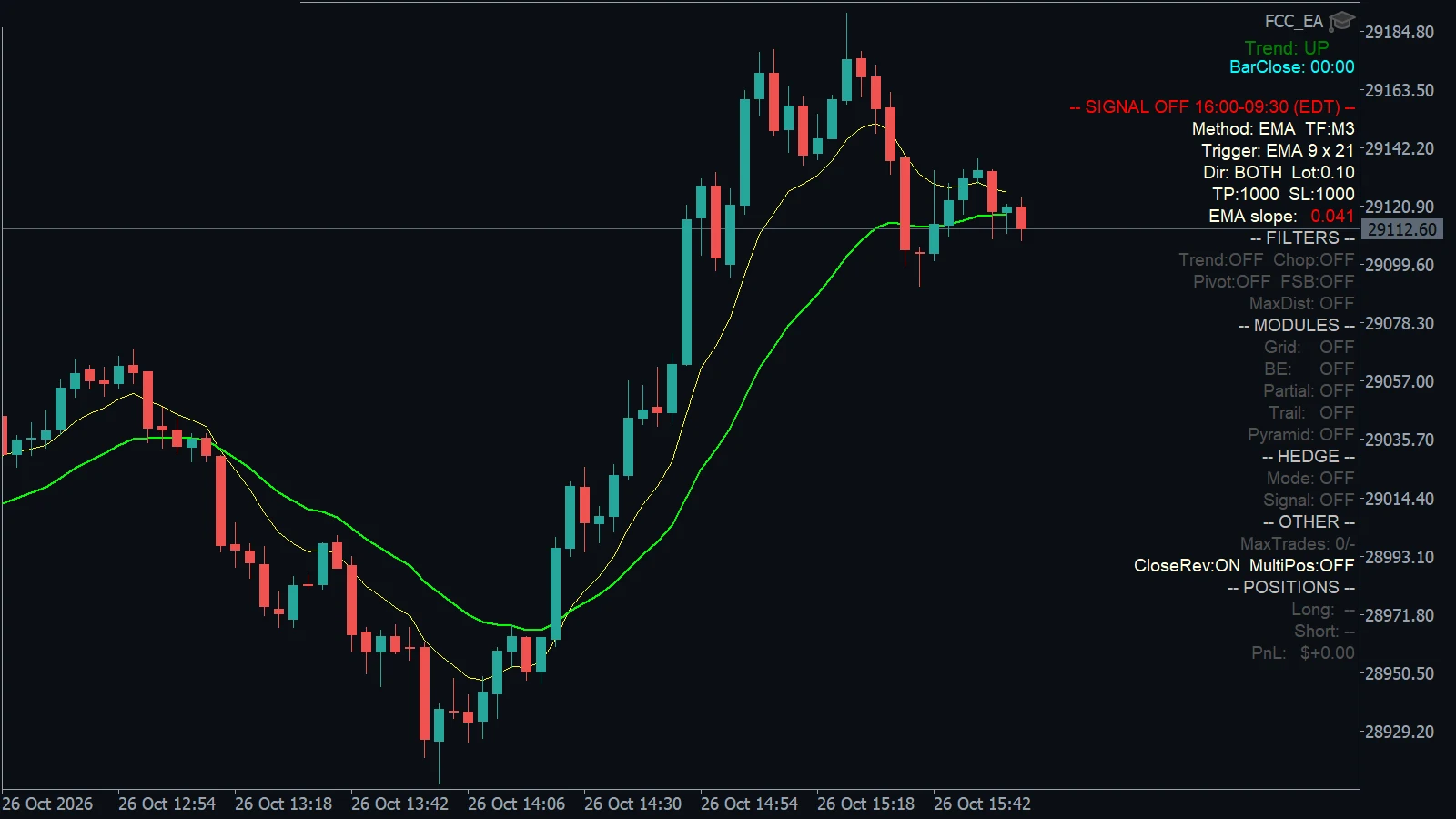
- Outside the window: the header turns red and shows when FCC_EA is off, here with Trading Start Time 09:30 and Trading End Time 16:00 in New York time.
The Experts tab logs each start and end of the window, for example Trading Time: STOP — outside trading window.
Closing everything at a set time
Close All Trades at is different from the window above: it closes all positions and pending orders of FCC_EA on the symbol once a day. See Close all at a set time.
A trading or break time in a wrong format (for example 9.30 or 0930) stops FCC_EA at start with a message naming the setting; a wrong Close All time only gives a warning and leaves Close All off. See Start-up messages.
All settings for this feature Trading Time settings → Other settings →
Backtest this setup free in the Strategy Tester, and adjust it whenever the market changes; every feature is in every plan. Backtest results depend on your broker's data and don't guarantee future results.
Check the FAQ or write to us. We reply within one business day.