Pyramiding: adding to a winning trade
Available in FCC_EA Trading Panel Pro
Pyramiding is the opposite of a grid: when price moves in favour of an open trade, FCC_EA adds more positions in the same direction, to make more of a strong trend.
How it adds positions
- The next pyramid position opens when price is Min Distance Between Pyramid Orders points in profit beyond the newest position in that direction.
- Its lot is the first position's lot × Pyramid Lot Martingale Multiplier to the power of the number of positions already open: with 1.0 all lots are equal.
- Max Pyramid Orders is how many positions can be added to the first one, per direction: 3 = the first position + three pyramid positions.
- One Pyramid Order per Candle? (on by default) allows at most one pyramid position per candle of the Pyramid Timeframe.
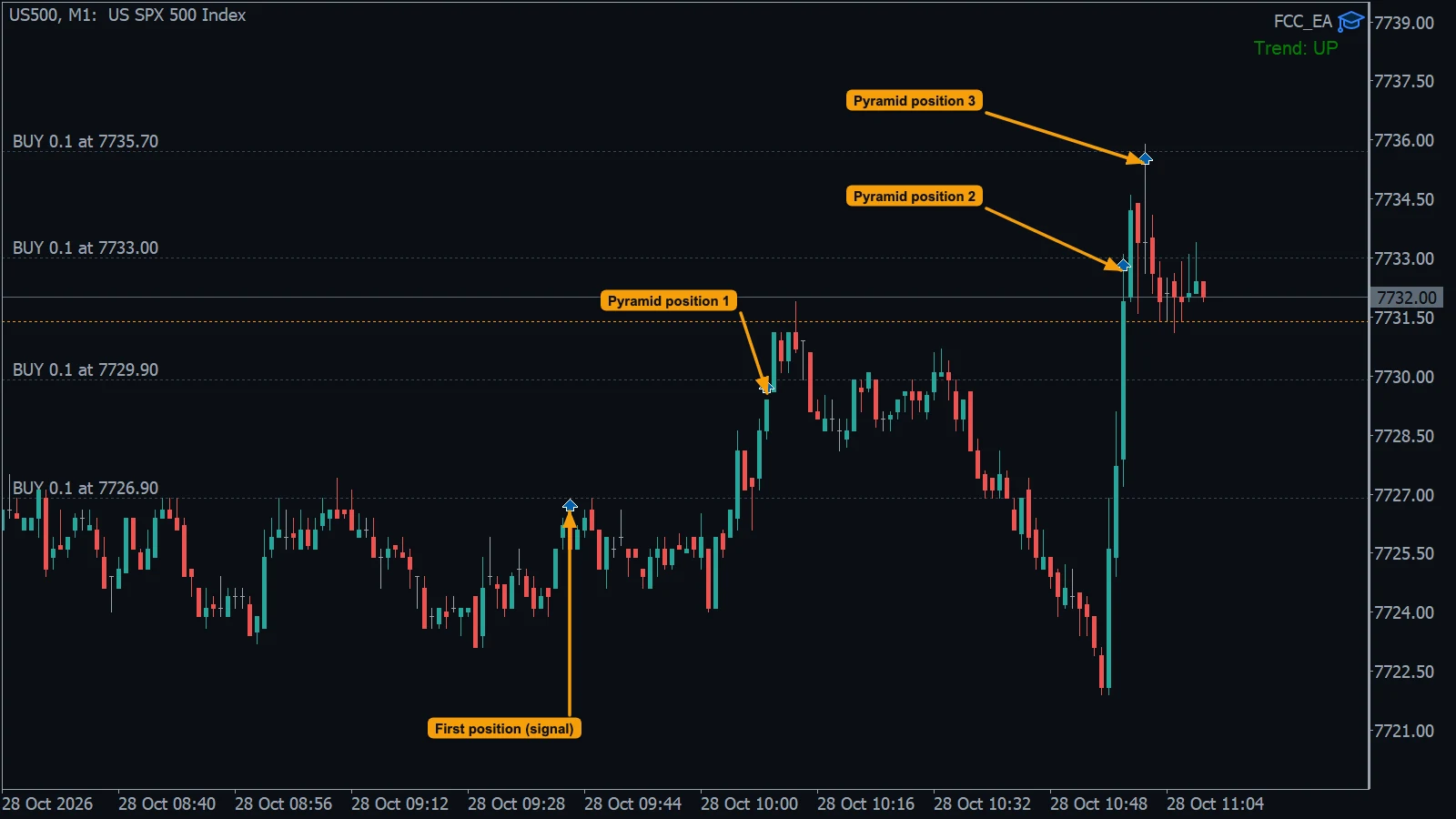
- First position (signal): a BUY from an EMA signal.
- Pyramid positions 1 to 3: each one opened when price was the set distance above the newest BUY. All lots are equal (multiplier 1.0).
Take profit and stop loss
- Take profit: after each add, the TP of all positions moves to their average entry ± Take Profit. Every pyramid position enters at a worse price, so the average and the TP move further away.
- Stop loss: each new position copies the current stop price of the first position. If breakeven or trailing has already moved that stop, the new position gets the moved stop.
Example, BUY 0.10 lot at 1.10000 on EURUSD, Min Distance Between Pyramid Orders 500, Max Pyramid Orders 3, Pyramid Lot Martingale Multiplier 1.0, Take Profit 1000:
| Position | Opens at | Lot | Average entry | TP of all |
|---|---|---|---|---|
| First (signal) | 1.10000 | 0.10 | 1.10000 | 1.11000 |
| Pyramid 1 | 1.10500 | 0.10 | 1.10250 | 1.11250 |
| Pyramid 2 | 1.11000 | 0.10 | 1.10500 | 1.11500 |
| Pyramid 3 | 1.11500 | 0.10 | 1.10750 | 1.11750 |
Without pyramiding the trade would have closed at 1.11000. With it, all four positions run on to 1.11750, but if price turns at 1.11500 the newest position is the first one to lose.
Protect what the trend gave
A turn after a few adds can take back the profit of the whole group. Two ways to limit that:
- Shrinking lots: Pyramid Lot Martingale Multiplier below 1 makes each new position smaller. With a first lot of 0.20 and 0.5: 0.20, then 0.10, then 0.05. Lots are rounded to the symbol's lot step.
- Breakeven or trailing: both work from the average entry of the group and move every stop. See Breakeven and trailing.
Together with other modules
- Grid, pyramid and add-on positions share one count: Max Pyramid Orders and Max Grid Orders each count all positions added to the first one in that direction of the slot.
- A pyramid add does not allow another partial close; a grid add does.
- Pyramiding stops when a hedge cycle becomes active. See Hedge mode explained.
- The Trading Panel MANAGEMENT section of Manual trading (Panel) mode has no pyramid values: the PYRAMID settings apply as they are.
The Experts tab logs each add, for example Pyramid: BUY 0.10 at 1.10500 (position 2).
All settings for this feature Pyramid settings →
Backtest this setup free in the Strategy Tester, and adjust it whenever the market changes; every feature is in every plan. Backtest results depend on your broker's data and don't guarantee future results.
Check the FAQ or write to us. We reply within one business day.