PLAN tool: plan a trade on the chart
Available in FCC_EA Trading Panel Pro Trading Panel Free
The PLAN tool works the same in the Trading Panel built into FCC_EA and in the standalone FCC Trading Panel Free and Pro.
The PLAN tool draws a planned trade on the chart, like the long / short position tool of TradingView: an entry, a take-profit zone and a stop-loss zone, with what each would make or cost. You plan by dragging; you trade with the Trading Panel buttons.
Open a plan
In the Trading Panel title bar click ▲ for a long (BUY) plan or ▼ for a short (SELL) plan. The active button lights up green or red; click it again to close the plan.
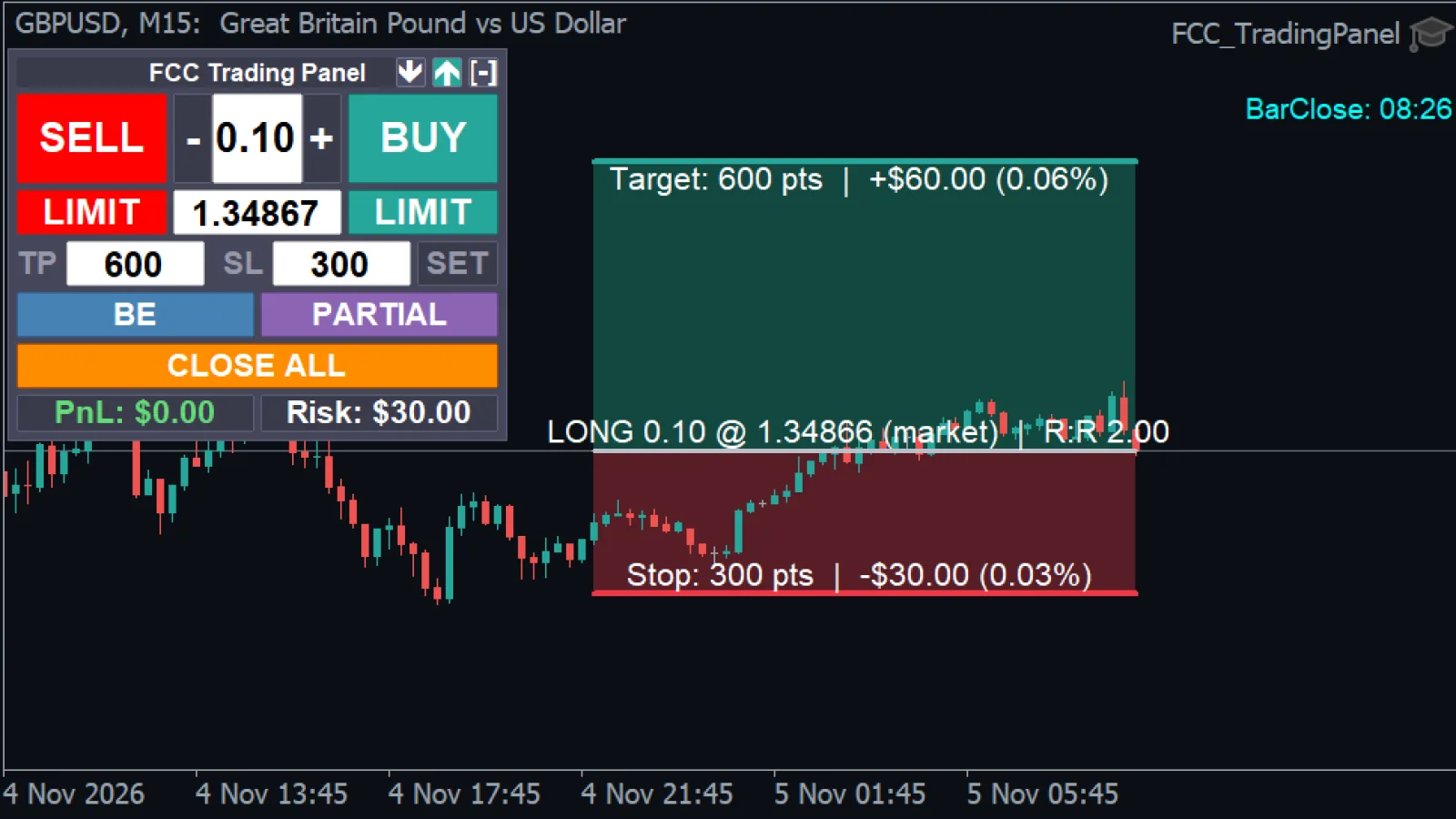
- Take-profit zone with the possible profit: points, money and % of balance.
- Entry line: LONG, lot, price, order type (here market: the entry follows the price) and R:R.
- Stop-loss zone with its label.
What the plan shows
- Entry:
LONG 0.10 @ 1.10250 (market) | R:R 2.00. The order type is market while the entry follows the price, or LIMIT / STOP once you have moved the entry away from it. - Target:
Target: 1000 pts | +$100.00 (1.00%): distance, profit at the lot of the Trading Panel and the share of your balance. - Stop:
Stop: 500 pts | -$50.00 (0.50%).
Adjust by dragging
Press the left mouse button on the entry, TP or SL line and drag it up or down. While a plan is open, the chart does not scroll with the mouse, so the drag moves only the line. When you let go:
- the TP and SL distances go into the Trading Panel TP and SL fields,
- a moved entry goes into the LIMIT price field.
It works the other way too: typing new values in those fields moves the plan. An entry you have not moved follows the market price.
Send the trade
The plan itself never trades. When it looks right:
- BUY / SELL opens at market with the TP and SL from the fields,
- LIMIT places the pending order at the planned entry.
Change the lot in the Trading Panel and the money values of the plan update at once.
See also: Trading Panel overview.
All settings for this feature Other settings → Trading Panel settings →
The one-click panel with the PLAN tool, breakeven, partial close and trailing. Email only, no card, no license key. FCC_EA includes the full panel.
Check the FAQ or write to us. We reply within one business day.