Telegram alerts from FCC_EA
Available in FCC_EA Trading Panel Pro
FCC_EA can send a Telegram message when it opens or closes a trade and when something needs your attention. You need a Telegram bot of your own; it takes about five minutes to set up.
Create a bot
- In Telegram, open a chat with @BotFather (the official bot with the blue check mark).
- Send
/newbotand follow the questions: a display name, then a username ending inbot. - BotFather replies with a token that looks like
7012345678:AAH.... Copy it. Anyone with the token can control the bot, so keep it private.
Start a chat with the bot
Decide where the messages should go:
- To you only: open your new bot in Telegram and press Start (or send it any message). A bot cannot write to you before you have done this.
- To a group: add the bot to the group as a member.
- To a channel: add the bot to the channel as an administrator that may post messages.
Find the chat ID
- Send any message to the bot (or in the group where you added it).
- Open this address in a browser, with your token in place of
<TOKEN>:
https://api.telegram.org/bot<TOKEN>/getUpdates- In the text that appears, find
"chat":{"id":followed by a number. That number is the chat ID. A private chat has a positive number such as123456789; a group or channel has a negative one such as-1001234567890(copy the minus sign too).
If the page shows only "result":[], send another message to the bot and reload the page.
Allow Telegram in MetaTrader
In MetaTrader 5 open Tools › Options › Expert Advisors, make sure Allow WebRequest for listed URL is ticked and the list contains:
https://api.telegram.orgSee Allow web requests.
Enter the settings
Open the FCC_EA settings (F7 on the chart), go to the === ALERTS === section and set:
| Setting | Value |
|---|---|
| Enable Telegram Alerts? | true |
| Telegram Bot Token | the token from step 1 |
| Telegram Channel/Group ID | the chat ID from step 3 |
Click OK. The next event FCC_EA reports reaches your Telegram.
Which events send a message
| Event | Sent when |
|---|---|
| A trade opened: from a signal or from the Trading Panel | Always, while Telegram alerts are on. With Include TP/SL Prices in Open Alert? the message adds the TP and SL (or hedge zone) prices. |
| A position or a group of positions closed, with the result | Alert on Position Close (with PnL)? |
| A partial close | Alert on Partial Close? |
| A hedge cycle became active | Alert on Hedge Active: first activation only, or every new hedge order |
| A failed-break reset in hedge mode | Alert on Hedge Failed-Break Reset? |
| Equity fell below the Equity Guard limit | Use Equity Guard?, repeated at most every Equity Alert Interval |
| A problem: a close or a hedge order the broker rejected, a license that blocks new trades, a new FCC_EA version | Always, once per problem |
Trades you open with the Trading Panel send an open alert too: BUY / SELL as Buy Signal: … at … without the Timeframe and Method lines, a LIMIT order as Buy Limit Filled or Buy Stop Filled when it fills. Grid, pyramid and hedge positions send no open alert of their own.
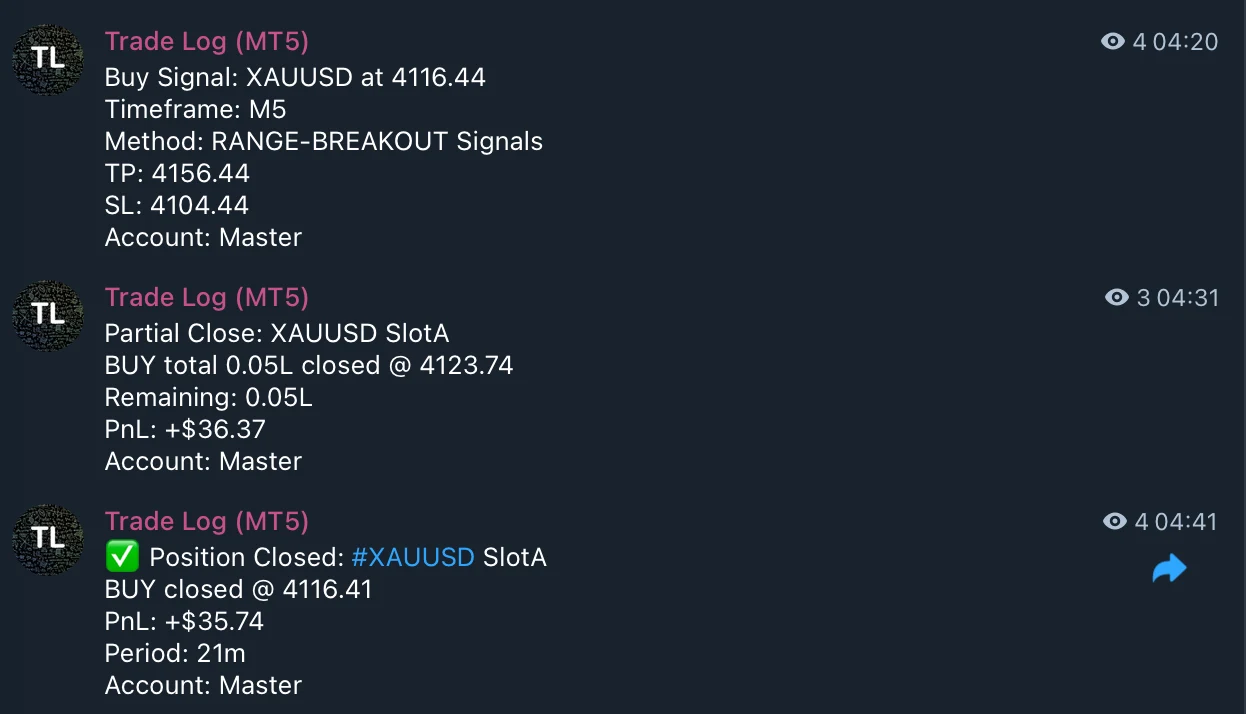
- Buy Signal: symbol, price, timeframe, method, and the TP and SL with Include TP/SL Prices in Open Alert? on.
- Partial Close: the closed and the remaining lot, with the result.
- Position Closed: close price, result and how long the trade was open.
Account: Masterat the end of each message is the Custom Text Added to Alerts.
Custom Text Added to Alerts is added at the end of every message, for example the account name, so you can tell several terminals apart.
Problems
FCC_EA writes the reason to the Experts tab, at most once an hour per problem:
| Message in the Experts tab | What to do |
|---|---|
WebRequest to https://api.telegram.org is not allowed | Add the address in Tools › Options › Expert Advisors, see step 4. This one also shows an alert, once. |
the Bot Token is wrong | Copy the token from BotFather again, without spaces. |
bad request - check the Chat ID | The chat ID is wrong or incomplete; for a group, check the minus sign. |
the bot cannot write to this chat | Press Start in the chat with the bot, or add the bot to the group / as a channel admin. |
Telegram alerts are ON but the Bot Token / Chat ID is not set | Shown at start: fill in both settings. |
Telegram messages never affect trading: if Telegram is down or a setting is wrong, FCC_EA keeps trading normally.
All settings for this feature Alerts settings →
Backtest this setup free in the Strategy Tester, and adjust it whenever the market changes; every feature is in every plan. Backtest results depend on your broker's data and don't guarantee future results.
Check the FAQ or write to us. We reply within one business day.