Stop loss and take profit
Available in FCC_EA Trading Panel Pro Trading Panel Free (basic)
Trading Panel Free: take profit and stop loss at the broker. The SL timeout (virtual stop) and hedge mode are in Pro and FCC_EA.
Every trade FCC_EA opens from a signal gets a stop loss and a take profit, set in MANAGE POSITION. Both are distances in points from the entry price (see points).
One real FCC_EA trade on DE40 M3 (12 November 2026, demo account): a SELL 0.2 from a signal, with Stop Loss 5000, Take Profit 14000, Partial Close Distance 4000 at Partial Close % of Position 50, Breakeven Distance 6000, Trailing Start 8000 and Trailing Distance 3000. The other management articles follow the same trade.
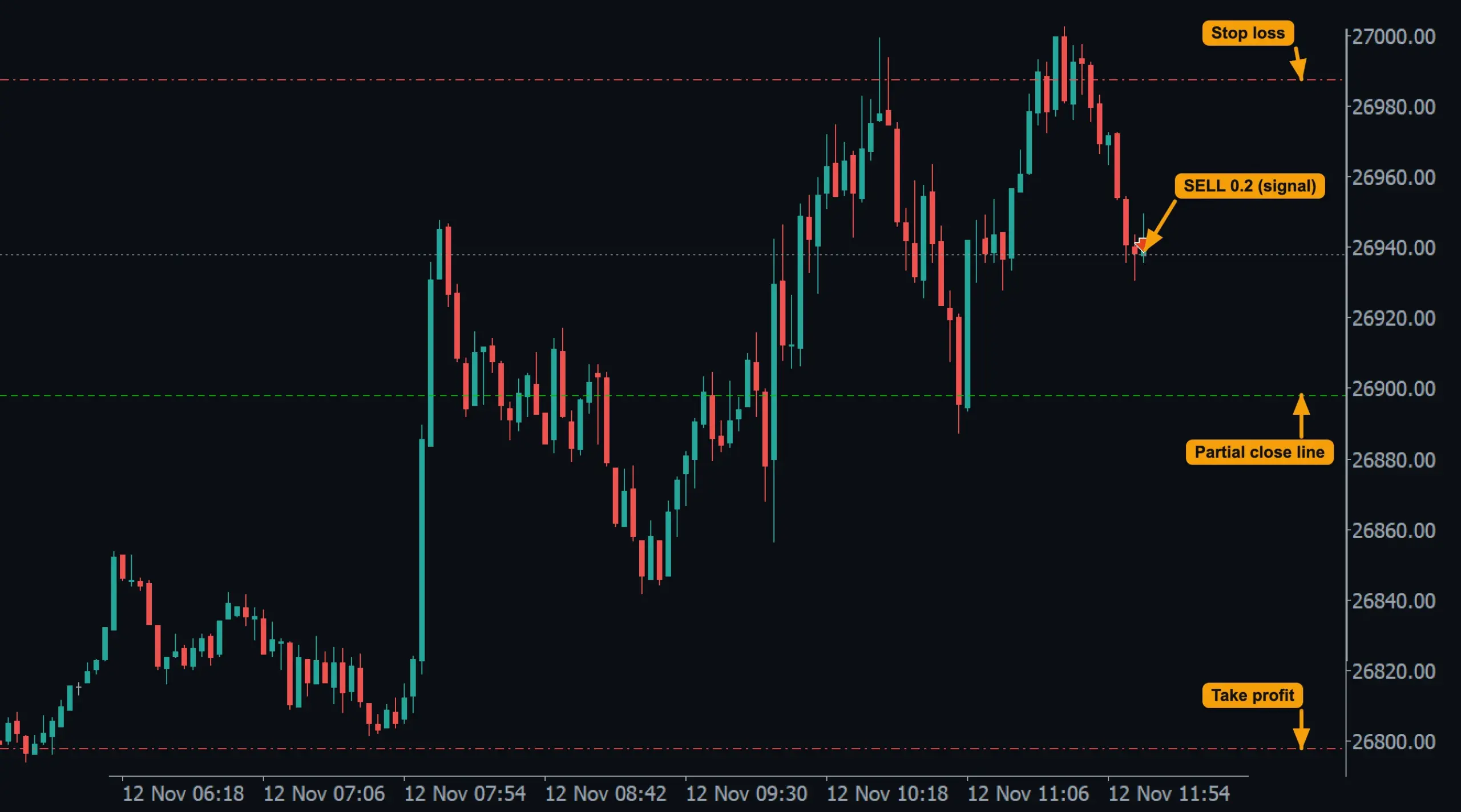
- SELL 0.2 from a signal.
- Stop loss above and take profit below: Stop Loss and Take Profit points from the entry. On a BUY they are the other way round.
- Partial close line: drawn because partial close is on (see Partial close).
Take profit: one target for the group
When a slot holds several positions in one direction (grid, pyramid or add-on positions), they all get the same take profit: their average entry price ± Take Profit. Each time a position is added, the average changes and every TP moves with it.
Example, Take Profit = 1000 on EURUSD (5 digits):
| Positions | Average entry | TP of all |
|---|---|---|
| BUY 0.10 at 1.10000 | 1.10000 | 1.11000 |
| + grid BUY 0.20 at 1.09500 | 1.09667 | 1.10667 |
So after a grid add a smaller move back is enough to close everything in profit. See Grid, Pyramiding and Partial close.
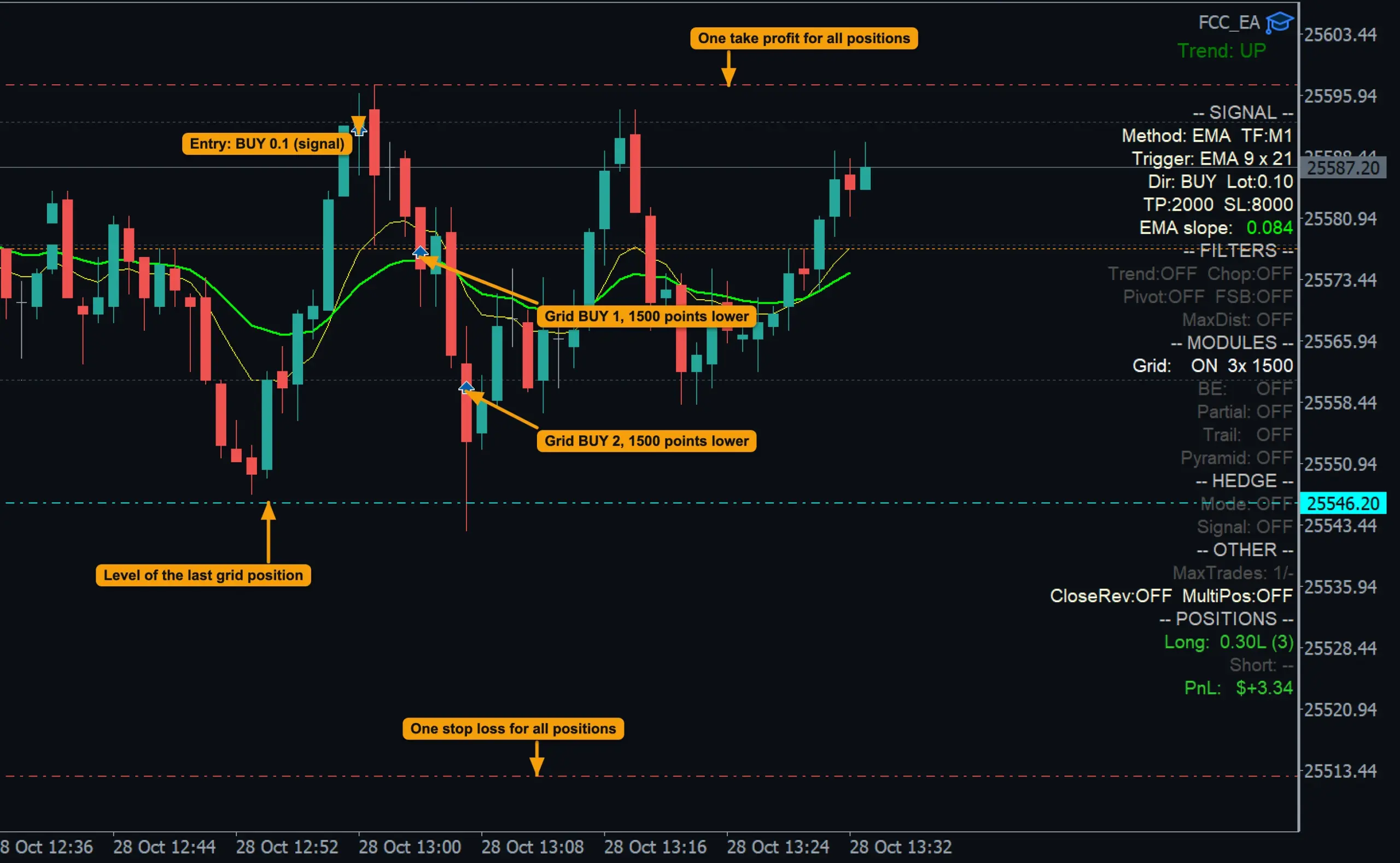
- Three BUY positions, one take profit: measured from their average entry and moved with every grid add.
- One stop loss: the grid BUYs copied the stop of the first position.
Stop loss: per position
- The first position gets its SL at entry ± Stop Loss.
- Positions added later (grid, pyramid, add-on) copy the stop price of the first position.
- Breakeven and trailing then move the stops; see Breakeven and trailing.
Change them on open trades
The Trading Panel TP and SL fields with the SET button apply new distances to the open positions of a slot: the TP from the average entry, the SL as one stop price for the whole group, also from the average entry. See Trading Panel overview.
SL timeout: a stop that waits
Sometimes price spikes through a stop and comes straight back. With SL/Hedge Zone Timeout above 0:
- The position opens without a stop at the broker. FCC_EA draws the stop as an orange dotted line and watches it.
- When price reaches the line, a timer of SL/Hedge Zone Timeout starts.
- With Timer + wait for candle close, FCC_EA also waits for the current candle of the Signal Timeframe to close.
- Then it checks: price still beyond the line → the positions are closed; price back → nothing happens, and the next touch starts a new timer.
With the SL timeout on, nothing protects the position at the broker. If the terminal is closed or loses its connection, the stop is not executed. Use it only on a terminal that runs all the time (a VPS), and expect that a real move can run further than Stop Loss before FCC_EA acts.
In hedge mode
With Hedge Mode on, positions open without a stop loss: the hedge zone takes its place, and the hard stop in money (Hedge Hard SL) limits the loss of the basket. The SL timeout then applies to the hedge zone instead. See Hedge mode explained.
All settings for this feature Manage Position settings → Hedge Mode settings →
Backtest this setup free in the Strategy Tester, and adjust it whenever the market changes; every feature is in every plan. Backtest results depend on your broker's data and don't guarantee future results.
Check the FAQ or write to us. We reply within one business day.