Trend, VWAP and pivot filters
These filters decide in which direction a signal may trade. They work with every signal method: the method finds the signal, then each filter that is on checks it. A blocked signal opens nothing, and the reason is written to the Experts tab.
Filters only affect new trades from signals. Positions already open are managed as usual, and trades you open with the Trading Panel are not filtered. The only filter that closes anything is Close on Trend Change.
The trend, as FCC_EA sees it
The trend filters use two SMMA bands on the Trend/Chop Timeframe: a fast and a slow one, with the periods of SMMA SIGNALS SETTINGS. Each band has a high line (SMMA of the highs) and a low line (SMMA of the lows).
| Trend | When |
|---|---|
| UP | the fast band is fully above the slow band |
| DOWN | the fast band is fully below the slow band |
| Chop | the two bands overlap |
The current state is shown as a Trend: label at the top right of the chart, also when no filter uses it. Current chart follows the chart's timeframe; a higher timeframe gives a slower, steadier trend.
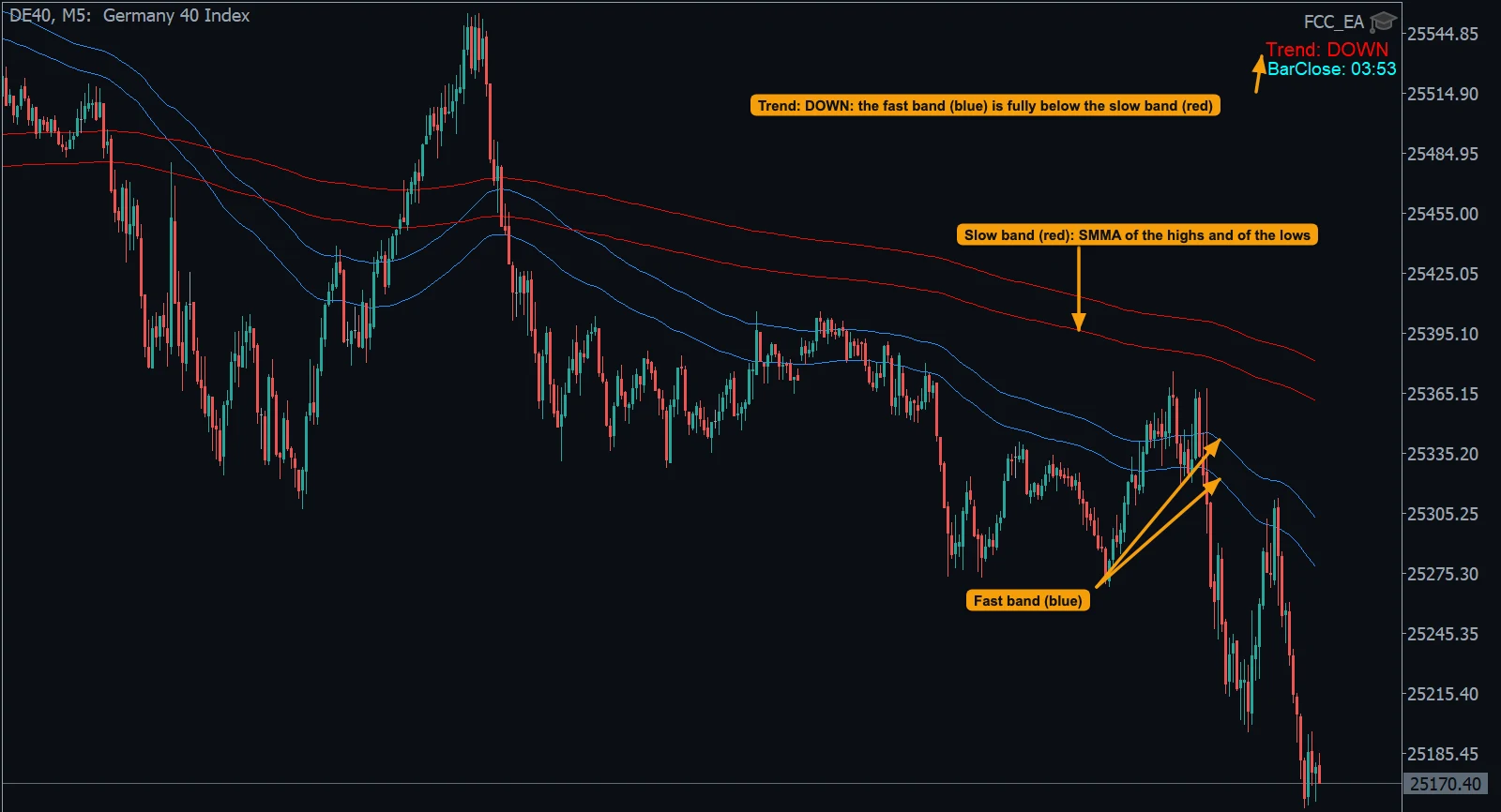
- The
Trend:label: DOWN, because the fast band is fully below the slow band. - The slow band (red): the SMMA of the highs and the SMMA of the lows.
- The fast band (blue). When the two bands overlap, the trend is Chop.
Trend filter and chop filter
| Filter | BUY allowed | SELL allowed | In chop |
|---|---|---|---|
| Use Trend Filter? | trend UP | trend DOWN | nothing opens |
| Use Chop Filter? | trend UP or DOWN | trend UP or DOWN | nothing opens |
The chop filter only keeps you out of sideways markets; it still allows a trade against the trend once the bands are apart. With both on, the trend filter decides.
Close on Trend Change? works on its own, also with the filters off: when the trend turns UP, all SELL positions of FCC_EA on the symbol are closed (both slots); when it turns DOWN, all BUY positions.
Fast SMMA band filter
Use Fast SMMA Band Filter? compares the last closed candle of the Signal Timeframe with the fast SMMA band on its own timeframe (Fast SMMA Band Filter Timeframe):
- BUY only when that candle closed above the band's high line;
- SELL only when it closed below the band's low line;
- inside the band, nothing opens.
It is a quick way to follow the direction of a higher timeframe without waiting for the two bands to separate.
VWAP filter
VWAP Filter allows BUY trades only above the session VWAP and SELL trades only below it:
| Option | Compares | Reacts |
|---|---|---|
| Bar close vs VWAP | the last closed candle of the Signal Timeframe | fast, can flip every candle |
| Main EMA vs VWAP | the trigger EMA | slower, steadier |
The VWAP and its session are set in VWAP SIGNALS SETTINGS, also when you trade another method. Outside the VWAP session, and before the VWAP is ready, the filter blocks every signal. See VWAP as a filter.
Pivot filter
Use Pivot Filter? trades only on one side of the day's pivot: BUY above it, SELL below it. The pivot is the classic daily pivot: (high + low + close of the previous server day) ÷ 3.
- Low strength: only the current price has to be on the right side.
- High strength: the fast SMMA band has to be on that side too, so a quick poke through the pivot is not enough.
EMA cross confirmation
EMA Cross Confirm: Wait N Bars and Re-Check is for the triggers where an EMA crosses a line: EMA Signals, the EMA Cross triggers of SMMA, TMA and Range Breakout, and the VWAP EMA Cross. After a cross, FCC_EA waits that many closed candles and opens only if the EMA is still on the new side. It filters out crosses that reverse at once, at the cost of a later entry. 0 = enter on the cross.
Combining them
Every filter that is on must allow the signal. Each one you add means fewer trades, not automatically better ones. Turn on one filter at a time and compare the results in the Strategy Tester or on a demo account.
| You want | Try |
|---|---|
| Trade only with the bigger trend | Trend filter on a higher Trend/Chop Timeframe |
| Stay out of sideways markets | Chop filter |
| Follow the intraday bias | VWAP filter |
| Respect the daily pivot | Pivot filter, High strength |
In the log
Typical lines when a filter blocks a signal:
Trend filter: BUY blocked (Trend: Chop)
VWAP filter: BUY blocked
Fast SMMA band filter: BUY blocked - the close is not above the fast SMMA bandMore reasons a signal can be skipped: No trades are opening.
All settings for this feature Filters settings →
Backtest this setup free in the Strategy Tester, and adjust it whenever the market changes; every feature is in every plan. Backtest results depend on your broker's data and don't guarantee future results.
Check the FAQ or write to us. We reply within one business day.