The info panel, line by line
Available in FCC_EA Trading Panel Pro Trading Panel Free
The info panel is the summary FCC_EA writes on the chart: whether it may trade right now, the main settings and the open positions. It is on by default; Display Info Panel? (OTHER SETTINGS) turns it off.
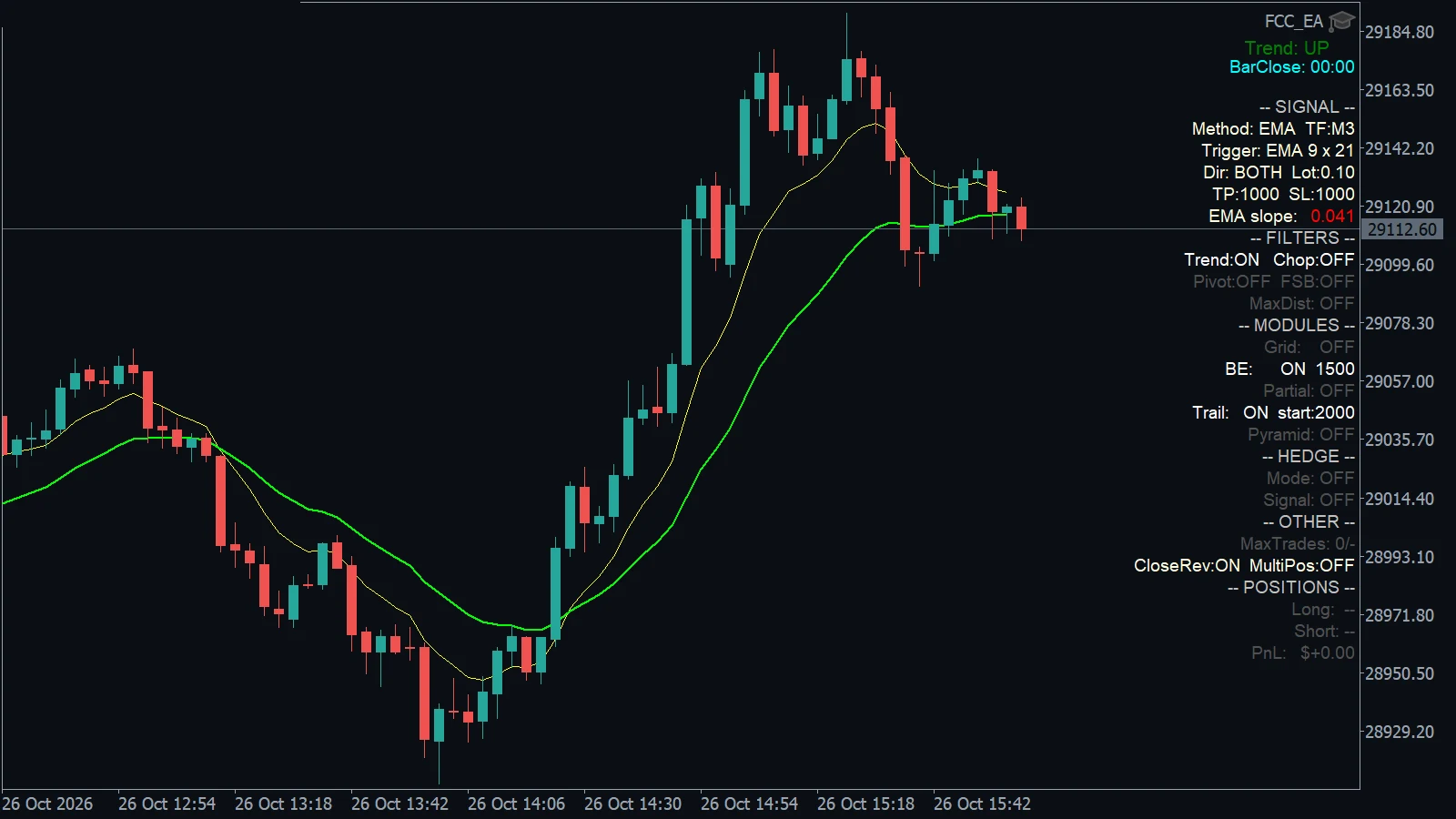
The FCC_EA info panel.
The header
The first line says whether FCC_EA may open new trades from signals. When several apply, the more important one is shown:
| Header | Meaning |
|---|---|
-- ALGO TRADING OFF -- (red) | MetaTrader does not let FCC_EA trade. See Algo Trading is off. |
-- LICENSE: … -- (red) | The license blocks new trades. See License status messages. |
-- MANUAL -- | Trading Mode is Manual trading (Panel): Full mode. |
-- TRADING PANEL PRO -- / -- TRADING PANEL FREE -- | The standalone Trading Panel is running. It has no signals: trades open only when you click. |
-- BREAK 1: 12:00-13:00 (EDT) -- (orange) | Inside a break. |
-- SIGNAL OFF 17:30-09:00 (EDT) -- (red) | Outside the trading window. |
-- SIGNAL -- | New trades from signals are allowed. |
Times are shown as you entered them, with the time zone. Below the header an orange Update available: x.y.z appears when a new version is out (Update FCC_EA).
Method and trade settings
| Line | Shows |
|---|---|
Method: EMA TF:M5 | The signal method and the Signal Timeframe. |
Trigger: … | The trigger the method uses. |
Dir: BOTH Lot:0.10 | Trading Mode (BUY, SELL, BOTH, MANUAL or OFF) and Fixed Lot. |
TP:1000 SL:1000 | Take profit and stop loss in points. |
Some methods add a line: the two Range windows for Range Breakout, the Bands used by SMMA, and the live EMA slope for EMA Signals (green when the slope filter would let a signal through, red when not).
FILTERS, MODULES, HEDGE, OTHER
Each section lists its settings; lines of modules and filters that are off are grey.
| Section | Lines |
|---|---|
| FILTERS | Trend and Chop, Pivot and FSB (Fast SMMA band), MaxDist (filters, max price distance) |
| MODULES | Grid (max × distance), BE, Partial (distance and percent), Trail (start), Pyramid (position management) |
| HEDGE | Mode with zone and multiplier, HardSL and the basket exits, Signal = Hedge Signal Mode (hedge mode) |
| OTHER | MaxTrades: 2/3 (trades today / limit), CloseRev and MultiPos (trade limits) |
In Full mode the MODULES lines show the values from the Trading Panel's MANAGEMENT section.
MaxTrades is grey without a limit, yellow while trades are left and red when the limit is reached.
POSITIONS
| Line | Shows |
|---|---|
A: BUY 0.10L (1) PnL=$12.40 | Slot A: direction, total lot, number of positions and the floating result. |
A: B0.10 S0.20 (2) PnL=$-8.10 [HEDGE] | A slot with buys and sells, in an active hedge cycle. |
B: empty | Slot B is not used (it is only used with Hedge Signal Mode). |
PnL: $+12.40 / Total: $… | The result of all FCC_EA positions on this chart. |
Green is a profit, red a loss.
Around the panel
- The
Trend:label at the top right shows the trend of the trend filters. - With the Equity Guard on,
Equity DD:at the top of the chart shows the start-of-day equity and the change since then. - Display Bar Close Countdown shows the time until the candle closes. See Indicators on the chart.
All settings for this feature Other settings → General settings → Manage Position settings →
Backtest this setup free in the Strategy Tester, and adjust it whenever the market changes; every feature is in every plan. Backtest results depend on your broker's data and don't guarantee future results.
Check the FAQ or write to us. We reply within one business day.