No trades are opening
FCC_EA opens a trade only when a signal appears and nothing blocks it. When a signal is blocked, FCC_EA writes the reason to the Experts tab of the Toolbox (Ctrl + T). Start there: most answers are one line in that log. How to read it: Reading the Experts log.
1. Look at the info panel header
The first line of the info panel tells you whether FCC_EA may trade right now:
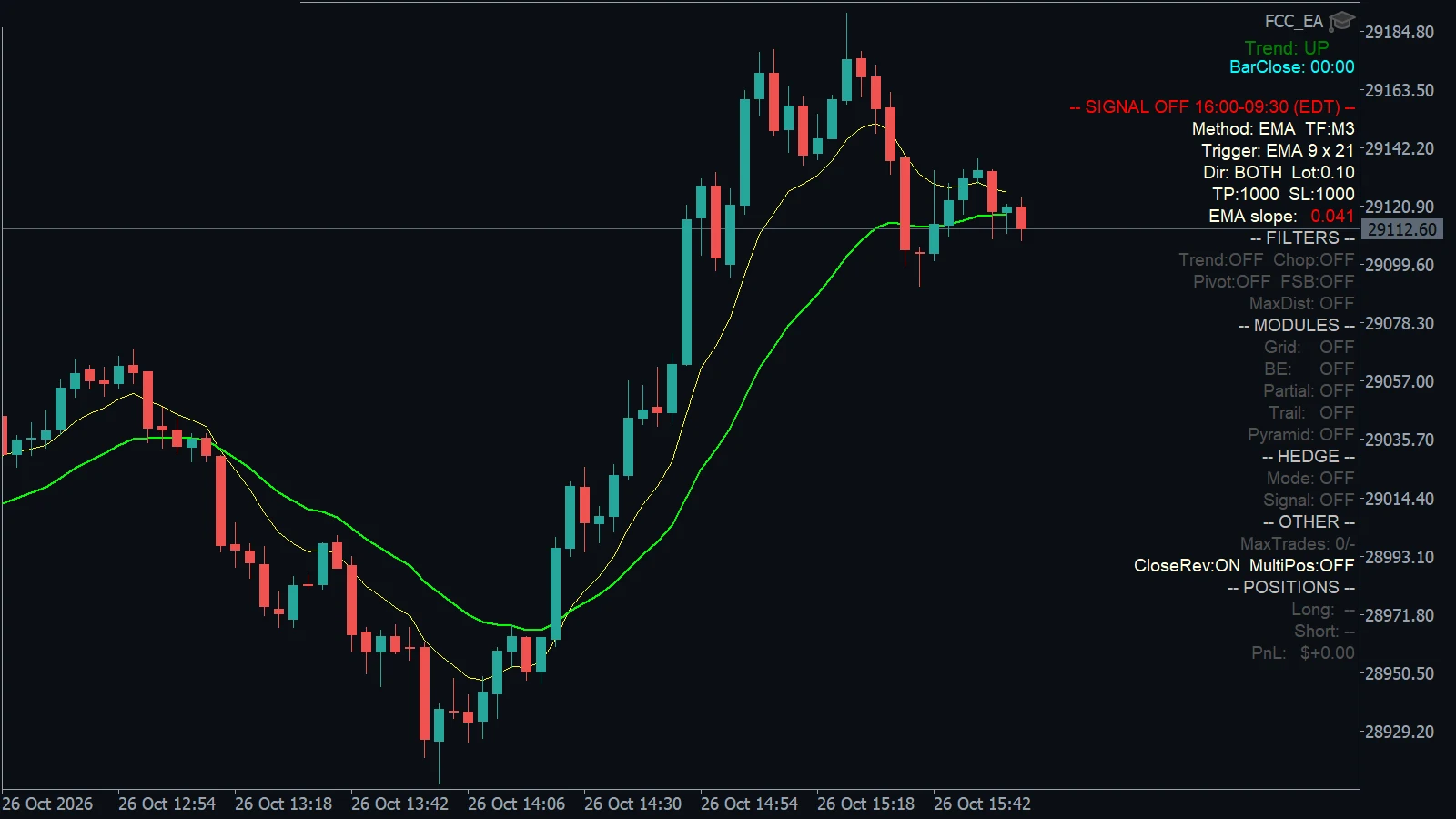
- Here the header is red,
-- SIGNAL OFF 16:00-09:30 (EDT) --: outside the trading hours, so no signal opens a trade.
| Header | Meaning |
|---|---|
-- SIGNAL -- | Trading allowed. Go on with the next steps. |
-- ALGO TRADING OFF -- (red) | Turn on the Algo Trading button in the toolbar and tick Allow Algo Trading in the EA's Common tab. The Experts tab names which of the two is off. See Algo Trading is off. |
-- LICENSE: … -- (red) | See License status messages. |
-- SIGNAL OFF hh:mm-hh:mm -- (red) | Outside your trading hours (TRADING TIME SETTINGS). The times are shown as you entered them, with the time zone. |
-- BREAK 1: … -- (orange) | Inside a break you set. |
-- MANUAL -- | Trading Mode is Manual trading (Panel): signals are off, you trade with the Trading Panel. |
The header does not show the Trading Mode: check the Dir: line below it. Dir: OFF means Trading OFF (nothing new opens), Dir: BUY or Dir: SELL means only one direction trades. See Trade limits and The info panel.
Also check the trading days (Trade on Monday … Friday) in TRADING TIME SETTINGS. Saturdays and Sundays (server time) are never traded, also on symbols that trade at weekends such as crypto.
2. Has there been a signal at all?
- Most methods look for a signal once per closed candle of the Signal Timeframe. On H1 that is once an hour; a quiet day can pass without one.
- Trading Mode Buy only or Sell only: ignores signals in the other direction.
- Some methods need time to warm up: for example VWAP waits for the start of its session, Range Breakout for the range to be complete, Liquidity Sweep for a level to be swept first.
- Turn on the signal preview or the method's lines (see the method's settings section) to see on the chart where signals would come.
3. Find the reason in the Experts log
When a signal comes but no trade opens, look for one of these lines:
| Line in the log | Reason and fix |
|---|---|
Max Trades per Day: limit of 3 reached - no new trades today | Max Trades per Day reached for today (server time). Max Trades per Day = 0 blocks every signal; -1 = no limit. See Trade limits. |
Spread filter: BUY blocked - spread … | The spread is wider than Max Spread Filter × the typical spread. Normal around the daily rollover and news. See Spread filter. |
Max Price Distance Filter: BUY blocked - … retry next candle | Price is already too far from the signal level (Max Price Distance Filter). FCC_EA retries on the next candle. See Max price distance. |
Loss Pause: BUY signal blocked - last losing trade (…) closed 12 min ago, pause 30 min | Loss Pause Filter: no new trades for a while after a trade (or a whole basket) closed at a loss, on either slot. See Trade limits. |
Chop filter: BUY blocked / Fast SMMA band filter: BUY blocked / pivot, VWAP, trend or slope filter lines | A filter in FILTERS SETTINGS (or the method's own filter, such as the EMA slope filter) rejected the signal. Turn the filter off to compare. See Trend, VWAP and pivot filters. |
Signal ignored: a position in the same direction is open in slot A … | A position in the same direction is already open. Turn on Allow Multiple Positions From Signals? if you want add-on positions. |
Opposite signal ignored: Close on Reverse Signal? is off | An opposite position is open and Close on Reverse Signal? is off. |
Signal ignored: slot A is in a hedge cycle | A hedge cycle is running; it is not interrupted by new signals. Hedge Signal Mode can open the new trade in the second slot. |
Market closed — … retry scheduled | The broker rejected the order because the market is closed (session break, holiday). FCC_EA retries when it opens, if the signal is still valid. |
… FAILED retcode=10019 or not enough money | Not enough free margin for the lot. Lower the lot or the hedge / grid multipliers. |
License: new … trade blocked | See License status messages. |
4. Still nothing?
- Check that FCC_EA really runs on the chart: its name in the top-right corner of the chart, and start-up lines in the Experts tab. If it is not there, see Start-up messages.
- Check the Journal tab too: it shows orders the broker rejected.
- Test the same settings in the Strategy Tester on recent data to see whether they produce signals at all.
- A trade opened but closed sooner than expected? See Why did FCC_EA close my trade?
- Contact support with a copy of the Experts tab (right-click › Copy) from the time you expected a trade.
All settings for this feature General settings → Other settings → Filters settings → Trading Time settings →
Backtest this setup free in the Strategy Tester, and adjust it whenever the market changes; every feature is in every plan. Backtest results depend on your broker's data and don't guarantee future results.
Check the FAQ or write to us. We reply within one business day.