Allow web requests in MetaTrader 5
MetaTrader 5 blocks every internet request from an Expert Advisor until you allow the address. FCC_EA needs one address for the license and one for Telegram alerts.
| Address | What it is for | Needed |
|---|---|---|
https://api.fccalgo.com | License check | Always |
https://api.telegram.org | Telegram alerts | Only if you use Telegram alerts |
The list is set once per terminal and applies to all charts in it.
Open the Expert Advisors options
In MetaTrader 5 open Tools › Options (Ctrl + O) and go to the Expert Advisors tab.
Turn on the list
Tick Allow WebRequest for listed URL.
Add the addresses
Double-click the empty line under the box (marked with a plus), type the address and press Enter. Repeat for the second address:
https://api.fccalgo.com
https://api.telegram.orgType them exactly like this: with https://, without a slash or anything else at the end.
Save
Click OK. You do not need to restart MetaTrader. If FCC_EA was already running and complained about the address, it tries again within a minute, or right away when you attach it to the chart again.
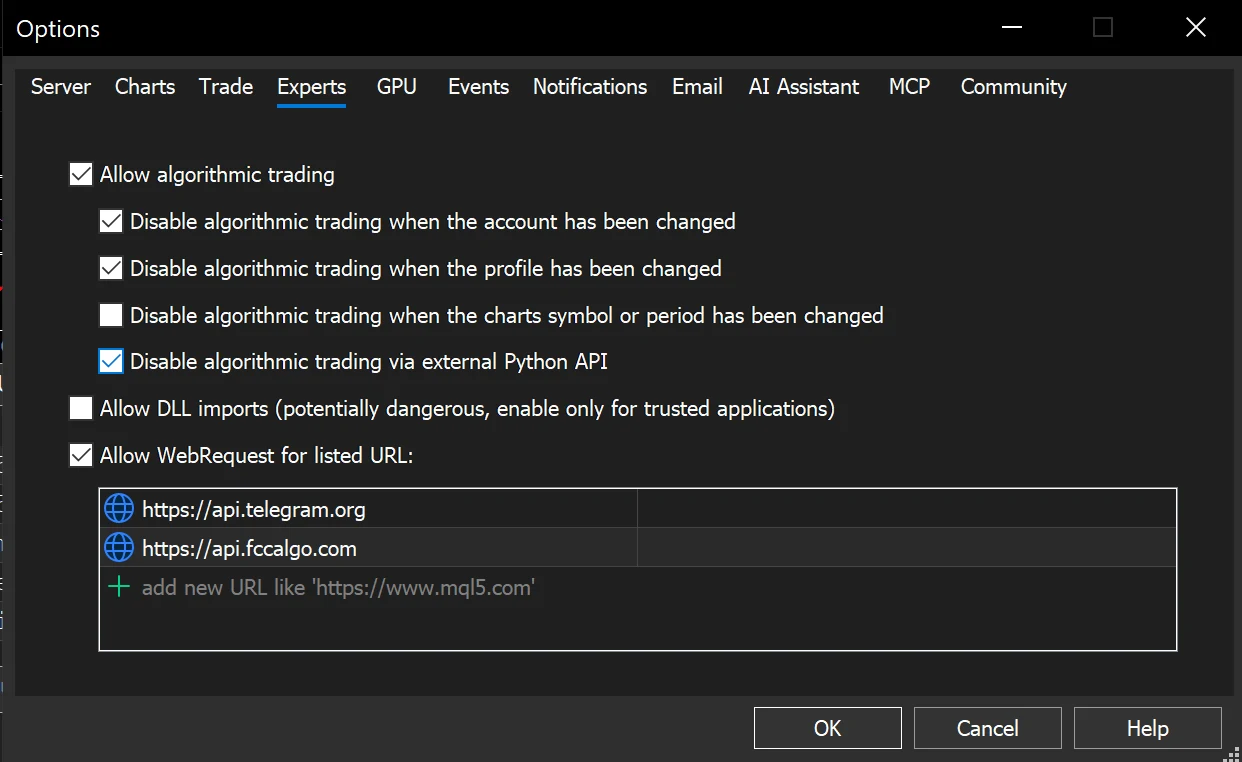
- Allow WebRequest for listed URL ticked.
- The two addresses in the list:
https://api.fccalgo.com(license) andhttps://api.telegram.org(only for Telegram alerts).
What you see when an address is missing
License server not allowed
FCC_EA shows an alert and writes in the Experts tab:
License: URL NOT ALLOWED. Add https://api.fccalgo.com to Tools > Options > Expert Advisors.The chart shows -- LICENSE: URL NOT ALLOWED -- in red. Without trades of its own that is all it shows. FCC_EA keeps managing the positions it already has, but opens nothing new until the address is on the list.
Telegram not allowed
If Telegram alerts are on, the first alert that fails shows once:
Telegram: WebRequest to https://api.telegram.org is not allowed - add it in Tools > Options > Expert Advisors > Allow WebRequest for listed URLTrading is not affected; only the Telegram messages are missing. See Telegram alerts.
Still a connection problem?
If both addresses are on the list and the chart still shows -- LICENSE: CONNECTION PROBLEM --:
- check that the terminal is connected (bottom-right corner of MetaTrader shows the connection, not "No connection"),
- check that a firewall or antivirus on the computer or VPS does not block MetaTrader,
- wait: FCC_EA retries by itself.
Once the license has been checked, a short interruption does not stop trading; see Activate your license.
All settings for this feature License settings → Alerts settings →
Backtest this setup free in the Strategy Tester, and adjust it whenever the market changes; every feature is in every plan. Backtest results depend on your broker's data and don't guarantee future results.
Check the FAQ or write to us. We reply within one business day.